
Why I built these tools (and the importance of feedback)

I’m a big believer in knowing two numbers: how much you own, and how much you owe.
Landing overseas? Sort your data first
An eSIM installs before you fly — no local SIM queue, no roaming bill.
Code: DREWDEAL (enter manually at checkout)
(Small referral our way if you use our link — doesn’t change your price.)
For over twenty years I’ve updated a spreadsheet every six months — more recently a Google Sheet — with exactly that. Assets, liabilities, net worth. It takes an hour. It’s the most useful hour of my financial year.
Last Christmas I decided there had to be a better way. So I spent the break building WealthMonkey — a proper full-featured app. Cloud storage, multi-year tracking, beautiful dashboards. I was very pleased with myself. I may have bored several family members and a number of my kids’ friends explaining how clever I was.
The result? Crickets.
Turns out people don’t want to create an account and hand their financial details to a stranger with a new website. Even a clever one. Fair enough.
Then CommBank sent me a PDF
In May my annual CBA loan review landed in my inbox. They wanted the usual: a full personal balance sheet and monthly living expenses breakdown. The same categories I’d been banging on about at Christmas. The same numbers I track every six months.
Of course they sent me a PDF which they wanted me to complete. I don’t own a printer and hate faffing around with editing PDF’s. Sigh
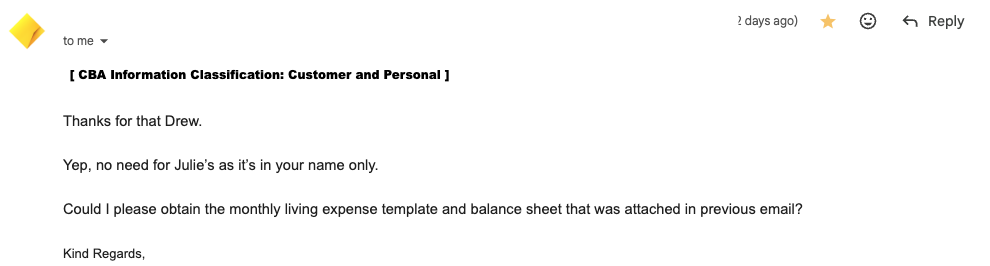
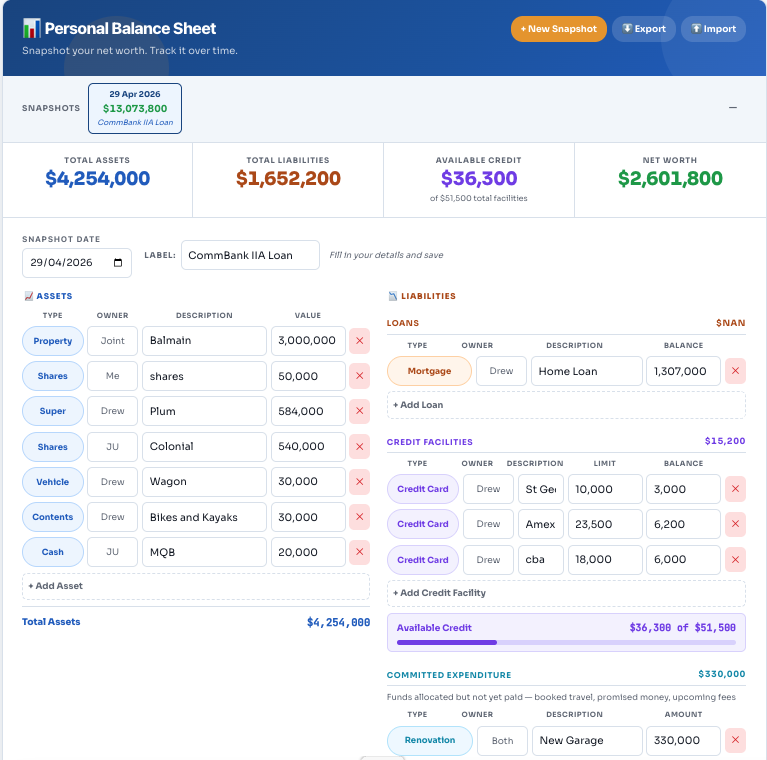
There was no way i was going to spend the weekend walking to office works to print the form and fill it in. So I decided I could invest a couple of days between cycling and blogging to building something light. A web tool that does exactly what the bank asks for — a balance sheet and a spending breakdown in the format lenders actually want — and then a bit more besides. No account required. No data leaving your device. Nothing to print.
It turned out so useful I wanted to share it with everyone. You can find it in our tools section and also here
Tuesday Bike Buddy named the tabs
I started brainstorming and testing with my Tuesday Bike Buddy. He had good feedback — real feedback, the kind you only get from someone who actually uses the thing rather than nods politely. His best contribution was pointing out you should be able to rename the scenario tabs. I’d set up a test with a “divorce budget” scenario as a joke. He suggested that maybe users shouldn’t be permanently stuck with my sense of humour. He was right. You can rename them now. The divorce budget scenario lives on as a cautionary tale.
The travel hacker connection
Here’s where it gets interesting for anyone who reads Points Brotherhood for the travel content.
Every time you apply for a premium travel credit card — Amex, ANZ, CommBank, Westpac, any of them — the bank asks for exactly this information. Monthly living expenses broken into categories. A personal balance sheet showing assets and liabilities. The form looks different at each bank but the questions are identical.
Most people fill these out badly. They guess at numbers, forget categories, underestimate expenses. Applications get declined or come back with lower limits than expected — not because the finances aren’t there, but because the paperwork didn’t tell the story clearly.
If you’ve already got your numbers in our Budget Planner and Balance Sheet, a credit card application becomes a twenty-minute copy-and-paste job. The expense categories map directly to what lenders ask for. The balance sheet matches the format every major Australian bank uses.
Better finances. Better applications. Better cards. Better lounges.
That’s the full loop.
These tools are free, private, and take about fifteen minutes to set up. Start with whichever feels most useful.
Free Budget Planner → Free Personal Balance Sheet → Find your next airport lounge →
Frequently Asked Questions
What is a personal balance sheet and why do I need one?
A personal balance sheet is a snapshot of your financial position at a point in time. It lists everything you own (assets) — property, super, shares, savings, vehicles — and everything you owe (liabilities) — mortgages, loans, credit card balances. The difference is your net worth. Banks ask for this on every significant loan or credit application. More importantly, tracking it over time shows you whether you’re actually getting ahead financially — which is the whole point.
What do banks look at when you apply for a credit card or home loan?
Every Australian lender assesses two things: your balance sheet (what you own versus what you owe) and your monthly living expenses (what you actually spend). They use this to calculate whether you can service the debt you’re applying for. The categories are nearly identical across CommBank, ANZ, Westpac, NAB and most other lenders — the forms just look different. Getting these numbers clear before you apply makes the process faster and your application stronger.
What counts as an asset on a loan application?
Property (your home, investment properties, land), superannuation, shares and managed funds, business equity, savings accounts, term deposits, and personal assets like vehicles. Generally speaking, if you could sell it and receive money, it’s an asset. Home contents and personal effects are usually included at a conservative estimate.
What counts as a liability?
Mortgages, investment loans, personal loans, car loans, HECS/HELP debt, credit card balances (lenders use the limit, not just what you currently owe), store cards, buy now pay later balances, overdrafts, and tax debts. One thing many people miss: banks count your full credit card limit as a liability, even if you pay it off every month. If you have $50,000 in unused credit limits across several cards, that affects your borrowing capacity. Worth knowing before you apply.
What are monthly living expenses and how do banks calculate them?
Monthly living expenses cover everything you spend to maintain your lifestyle — groceries, utilities, transport, insurance, entertainment, dining out, subscriptions, medical costs, and more. Banks categorise these into standard buckets and compare your figures against statistical benchmarks. If your numbers seem unrealistically low, they may substitute a higher benchmark figure. Accurate, realistic numbers work in your favour.
How often should I update my balance sheet?
Every six months is the sweet spot — often enough to catch meaningful changes, infrequent enough that it doesn’t feel like a chore. Annually at minimum. The Balance Sheet tool prompts you when your last snapshot is more than six months old. Each update takes about fifteen minutes once your first one is done.
Is my financial data safe in these tools?
Yes. Nothing is uploaded, stored on a server, or shared with anyone. All data lives in your browser’s local storage on the device you’re using. We can’t see it, access it, or lose it on your behalf. The tradeoff is that it’s device-specific — see the next question.
Does it work across multiple devices?
The tools store data locally on each device, so your data won’t automatically appear on your phone if you filled it in on your laptop. The solution is the Export function — download your data as a JSON file from one device and Import it on another. It takes about thirty seconds. We’d recommend exporting regularly as a backup regardless — local storage can be cleared if you wipe your browser data.
Can I compare my spending to other Australians?
Not directly — everyone’s situation is too different for a meaningful individual comparison. What we do offer is the Australian Averages feature in the Budget Planner, which pre-populates the tool with median spending figures for three household types: single person, couple without kids, and family with kids. These are sourced from ABS Household Expenditure data and Finder’s 2025 cost of living research. Use them as a starting point or a sanity check, not a target.
Do these tools work for any Australian bank, not just CommBank?
Yes. The expense categories and balance sheet structure are based on what’s standard across Australian lenders. CommBank’s format is the most detailed and comprehensive, so mapping to their categories means you’re covered for ANZ, Westpac, NAB, Macquarie, and most others. The tool is completely bank-agnostic — we just used the most thorough format as the template.
Can I use these tools when applying for a travel credit card?
Absolutely — that’s one of the main reasons we built them. Premium travel cards like the Amex Platinum, CommBank Ultimate Awards, ANZ Rewards Black, and Westpac Altitude Black all require a full income, expenses, and liabilities assessment. Having your numbers already organised in these tools makes that process significantly faster. And once you’ve got the card — the Lounge Finder will help you make the most of it.
What’s the difference between the Budget Planner and the Balance Sheet?
The Budget Planner is about cash flow — what comes in and what goes out each week, month, or year. It helps you understand your spending patterns and see how your expenses map to the 50/30/20 rule. The Balance Sheet is about position — what you own versus what you owe at a point in time. Both tools are useful on their own. Together they give you a complete financial picture — which is exactly what a lender sees when they assess your application.

Spending overseas? Skip the card markup
Wise gives you the real exchange rate on a card built for spending abroad — no foreign transaction fee stacked on top
(Small referral our way if you use our link — doesn’t change your price.)