
See Your Seat Before You Book a Flight

Every airline booking flow saves the same thing for last. You pick your dates, your fare class, sometimes your meal — and only at the very end, usually after you’ve already entered your card details or committed your points, does it show you which seats are actually left. By then you’ve mentally checked out. You click through and take whatever’s on offer.
I stopped doing that a while ago. If the seat map shows nothing but a middle seat by the galley, I’ll shift my dates by a day or two, or pay a bit more for a different fare, rather than lock myself into eight hours next to the crew rest area. It’s a small thing that makes a genuinely large difference to a long flight.
It doesn’t matter whether I’m paying cash or redeeming points, either. A business class seat bought with Qantas Points and a business class seat bought with a credit card are, in the airline’s eyes, exactly the same product. But the actual physical seat inside that cabin can be completely different — some configurations put you a step from a galley and a toilet queue, others give you a proper suite with a door. The fare class tells you what class you’re in. It tells you nothing about which seat you’re getting.
The fix, it turns out, is to see your seat before you book — not after. That’s the whole insight behind Seats.aero, and once I started using it that way, the old booking flow started to feel backwards.
See your seat before you book
Seats.aero shows real award availability and seat maps — before you commit to anything
(Small referral our way if you use our link — doesn’t change your price.)
In this post:
Seat selection is an afterthought by design
Airline websites aren’t built to help you choose a seat. They’re built to get you to commit first. Fare selection, add-ons, payment — the seat map only shows up once you’ve already made the decision that matters most, financially. At that point, walking away over a bad seat feels like a bigger deal than it should. Most people just take what’s there.
Landing overseas? Sort your data first
An eSIM installs before you fly — no local SIM queue, no roaming bill.
Code: DREWDEALNEW (new users) · already have Airalo? Use DREWDEAL instead
(Small referral our way if you use our link — doesn’t change your price.)
That’s not an accident so much as it is simply how the flow was designed — nobody built it to be adversarial, but nobody built it around the seat mattering either. The seat is treated as a detail. For a three-hour domestic hop, maybe it is. For a fourteen-hour redemption you’ve been saving points toward for a year, it really isn’t.
It’s not just a points thing
I used to think of seat selection as a “when I’m spending points” problem — the sort of thing you obsess over because the redemption is precious and you don’t want to waste it on a bad seat. But the same logic applies just as much when I’m paying cash. A better seat is a better seat, regardless of what currency got me into the cabin.
Where it matters most is in premium cabins with more than one seat type. A staggered business class layout might put half the cabin in proper suites and the other half facing backwards or squeezed against a wall. Qsuite, Club Suite, the newer Qantas A380 Business Suite — the marketing shows you the best seat in the cabin, not the one you’ll actually get assigned if you book blind.
If the seat map for your preferred date looks average, check a day either side before you commit. Award and premium cabin availability shifts constantly, and a one-day shift is often the difference between a window seat in a proper suite and a middle seat against the galley.
How Seats.aero flips the order
Seats.aero is built for exactly this — checking before committing, not after. You search a route and date range, and it shows real-time award availability across a wide range of airlines and loyalty programs at once, rather than making you check each program’s own site one at a time.
The part that actually solves the seat problem is its seat map feature. For a growing number of flights, you can pull up the aircraft’s actual layout — which seats are already taken, which are open, and where the good ones sit — before you’ve logged into a frequent flyer account or entered a single payment detail. You can filter out airlines you’d rather avoid on a given route, and on the paid tier the search window stretches out to a year ahead, which matters if you’re planning around a specific seat rather than just a specific date.
None of this books the seat for you — you’ll still choose it on the operating airline’s own site once you’re ready. What it does is remove the guesswork before that point, so you’re not finding out what’s actually available at the exact moment you’re meant to be deciding whether to commit.
The Qantas A380 example
This is easiest to see on an aircraft with a lot of search volume around exactly this question — Qantas’s A380 is a good one, because the fleet includes both the original business class cabin and the newer Business Suite, and the two are genuinely different products sitting under the same fare class. Checking the seat map first is the only way to know which one you’re actually being offered.
I’ve written up the full seat-by-seat breakdown of both cabins separately — which seats to chase and which to avoid in the original A380 business cabin, and the same for the newer A380 Business Suite — worth a look once you know which product your flight is actually running.
Step by step: checking a Qantas A380 seat map on Seats.aero
Here’s the actual process, using QF11 — Qantas’s flagship Sydney–Los Angeles A380 service — as the worked example:
1. Search the route and a date range, not a single date. Enter your origin, destination, and cabin (business), then widen the dates either side of when you want to travel. Availability — and which specific cabin gets flown — can shift day to day.
2. Filter to Qantas. With results back, narrow to Qantas-operated flights only, so you’re not scrolling past partner airlines you don’t care about for this trip.
3. Open the Seat Map Viewer for the flight. Click into a flight showing business availability and pull up its seat map. This is where you can see the aircraft’s actual layout, pulled straight from the airline’s own reservation system — occupied seats greyed out, open seats marked clearly — before you’ve told anyone you’re interested in booking.
4. Toggle between the two decks. The A380 flies over two levels, so the viewer gives you an Upper/Main switch above the map rather than trying to cram both onto one screen.
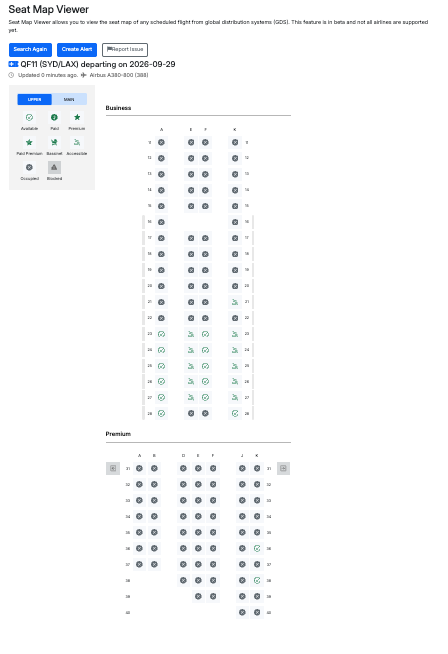
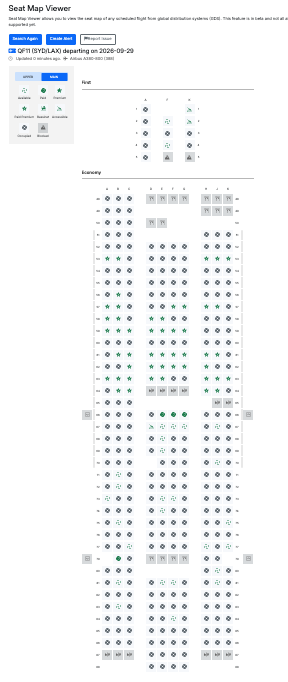
5. Work out which cabin you’re looking at. Because Qantas runs two different A380 business products fleet-wide, check the layout against the seat guides above to confirm whether this particular aircraft is running the original cabin or the newer Business Suite — the row numbers and configuration will tell you.
6. Decide from there — not after you’ve booked. If the map shows a rough spot (galley-adjacent, no direct aisle access), that’s your cue to try a day either side before committing, using the same search.
Seat Map Viewer is a beta feature pulling data straight from the airlines’ own reservation systems (GDS), and not every airline or aircraft is covered yet. Qantas’s A380 is one of the ones that is — but if you search a flight and no map appears, that’s why.
Seats.aero is free to search, with a paid tier for extended search windows and faster alerts. Check seat availability before you book.
(Small referral our way if you use our link — doesn’t change your price.)
Landing overseas? Sort your data before you go
An eSIM is a digital SIM you install on your phone before you fly — no swapping a physical card, no local SIM queue when you land, no roaming bill shock.
Airalo codes: DREWDEALNEW / DREWDEAL · Yesim code: DREWDEAL (enter manually at checkout)
Not sure which one? Compare Airalo vs Yesim →
(Small referral our way if you use our link — doesn’t change your price.)
Can you see your seat before booking a flight?
Not through most airline booking flows — seat maps usually only appear near the end of the process, after you’ve selected a fare. Tools like Seats.aero let you check real seat availability and layout before you commit to a booking.
Does Seats.aero show real seat availability?
Yes. Seats.aero pulls live award availability across a wide range of airline and loyalty programs, and for many flights includes a seat map showing which specific seats are already occupied.
Can I check seat maps for a paid (cash) booking, not just points?
Yes — the seat map itself reflects the aircraft’s actual layout and occupancy, regardless of whether you end up paying with cash or points. It’s useful for checking seat quality either way.
Is there a difference between the Qantas A380 business class and the Qantas A380 Business Suite?
Yes — Qantas operates both the original A380 business cabin and a newer Business Suite product on different aircraft within the fleet. They sit under the same fare class but are physically different seats, which is exactly why checking the seat map before booking matters.
How do I check the seat map for a specific Qantas A380 flight on Seats.aero?
Search your route and a date range on Seats.aero, filter results to Qantas, then open a specific flight showing business availability. Where a seat map is available, it shows the aircraft’s actual layout so you can see which seats are open before you book.
Does Seats.aero’s seat map feature work for every flight?
Not yet. Seat Map Viewer is a beta feature that pulls data from the airlines’ own reservation systems (GDS), and coverage varies by airline and aircraft. Qantas’s A380 is one of the aircraft it supports.
Is Seats.aero free to use?
Seats.aero has a free tier with real-time award search. A paid Pro tier extends the search window further out and adds faster alerts when seats become available.
Does paying more always get you a better seat?
No. A higher fare class guarantees a class of service, not a specific seat within it — cabins with more than one seat configuration (staggered business layouts, for example) can seat two passengers in the same fare class very differently. Checking the seat map is the only way to know which one you’ll get.
See your seat before you book
Seats.aero shows real award availability and seat maps — before you commit to anything
(Small referral our way if you use our link — doesn’t change your price.)