
Bali eSIM with a Local Number: Balitel Guide for Australians

I worked out of Jakarta more than ten years ago. Back then, getting a local number meant a queue, a SIM shop and a fair bit of pointing. I would have loved a Telkomsel eSIM that was live before the wheels touched down.
Indonesia has so much to offer, and a proper deep dive is on my bucket list. When I go, I’ll be getting a local number, not just data. If you’re staying more than a few days, a local SIM with local support beats the big global providers.
I haven’t tested Balitel yet. This guide covers what it is, how it works and who it suits, based on Balitel’s own documentation and setup screenshots. I’ll update it with first-hand results when I get there.
Disclosure: Points Brotherhood earns a commission if you buy through our Balitel links, at no extra cost to you. Code DREWDEAL gives you 10% off.
Best Bali eSIM with a phone number: quick verdict
Get a Bali eSIM with a phone number from Balitel if you want an Indonesian +62 number. Stick with Airalo if you only need data for a short trip.
| You are… | Best pick | Why |
|---|---|---|
| Staying a week or more | Balitel | Local number, local network, cheaper per GB on bigger plans |
| Using Gojek, Grab or other local apps | Balitel | Sign-up codes come by SMS to a local number |
| Heading beyond Bali (Lombok, Java, Raja Ampat) | Balitel | Runs on Telkomsel, Indonesia’s widest network |
| On a short stopover, data only | Airalo | No passport upload, installs in minutes |
| Hitting several countries on one trip | Airalo | One regional eSIM covers them all |
Travel eSIM vs local Bali eSIM: what’s the difference?
A travel eSIM gives you data only. A local eSIM gives you data plus a real Indonesian phone number.
| Travel eSIM (Airalo, Holafly) | Local eSIM (Balitel) | |
|---|---|---|
| Phone number | None | Indonesian +62 number |
| Calls and SMS | No | Yes, local |
| How it connects | Roams onto a local network | Native Telkomsel line |
| Setup | Scan a QR code | Passport form, QR code, IMEI check |
| Who activates it | You | Balitel, on your arrival day |
| Support | App or email | WhatsApp, 8am to 2am Bali time |
Keep your Australian SIM switched on for WhatsApp and calls from home. Your phone runs both lines at once.
Why you need an Indonesian phone number in Bali
Indonesia runs on apps, and many of them verify you by SMS to a local number.
- Gojek and Grab. Rides, food delivery and couriers. Sign-up codes can be unreliable on a foreign number; a +62 number removes the guesswork.
- GoPay and local wallets. Handy at warungs and small shops that don’t take cards.
- Calling locally. Your villa, driver, dive shop or restaurant can call or text you without international rates.
- Longer stays. The longer you’re there, the more local services you’ll want to sign up for.
If you’re only browsing, mapping and messaging, data alone will do.
How to set up a Balitel eSIM for Bali: step by step
A local Indonesian eSIM takes a few more steps than a travel eSIM. It’s not perfect, it’s a process, but most of it happens at home before you fly. Here’s the full flow, based on Balitel’s own screenshots.
Step 1: Buy your eSIM on balitel.com
Pick a plan and enter code DREWDEAL for 10% off. Buy any time before your trip. The plan’s days start on activation, not purchase. Keep your order confirmation email; you’ll need the 4-digit order number.
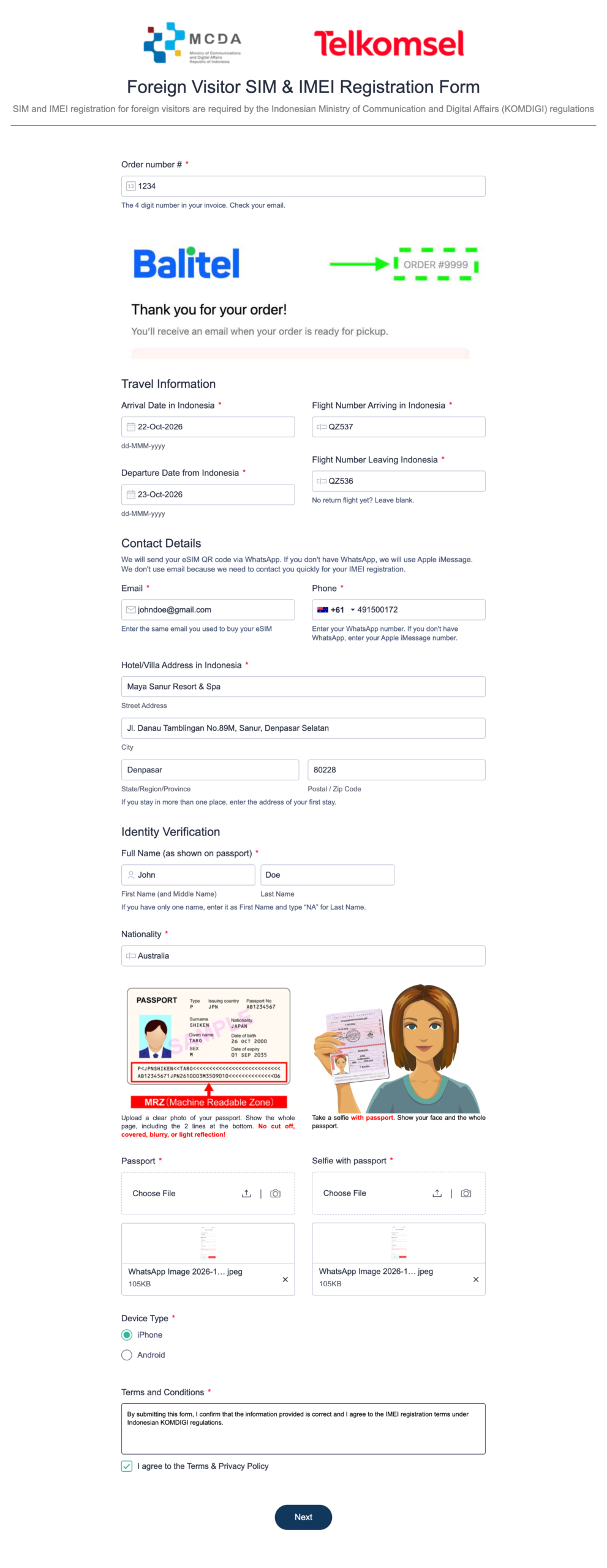
Step 2: Complete the passport registration form (about 2 minutes)
Indonesia’s KOMDIGI regulations require every foreign visitor’s SIM and phone IMEI to be registered. Balitel’s form asks for:
- Order number from your invoice email
- Arrival date and flight number into Indonesia
- Departure date and flight number out (leave blank if you have no return flight yet)
- Email (the one you bought with) and WhatsApp number
- Hotel or villa address for your first stay
- Full name exactly as shown on your passport, plus nationality
- Passport photo showing the whole photo page, including the two lines of code at the bottom. No cropping, blur or glare.
- Selfie holding your passport, with your face and the whole passport visible
- Device type: iPhone or Android
Step 3: Get your QR code on WhatsApp
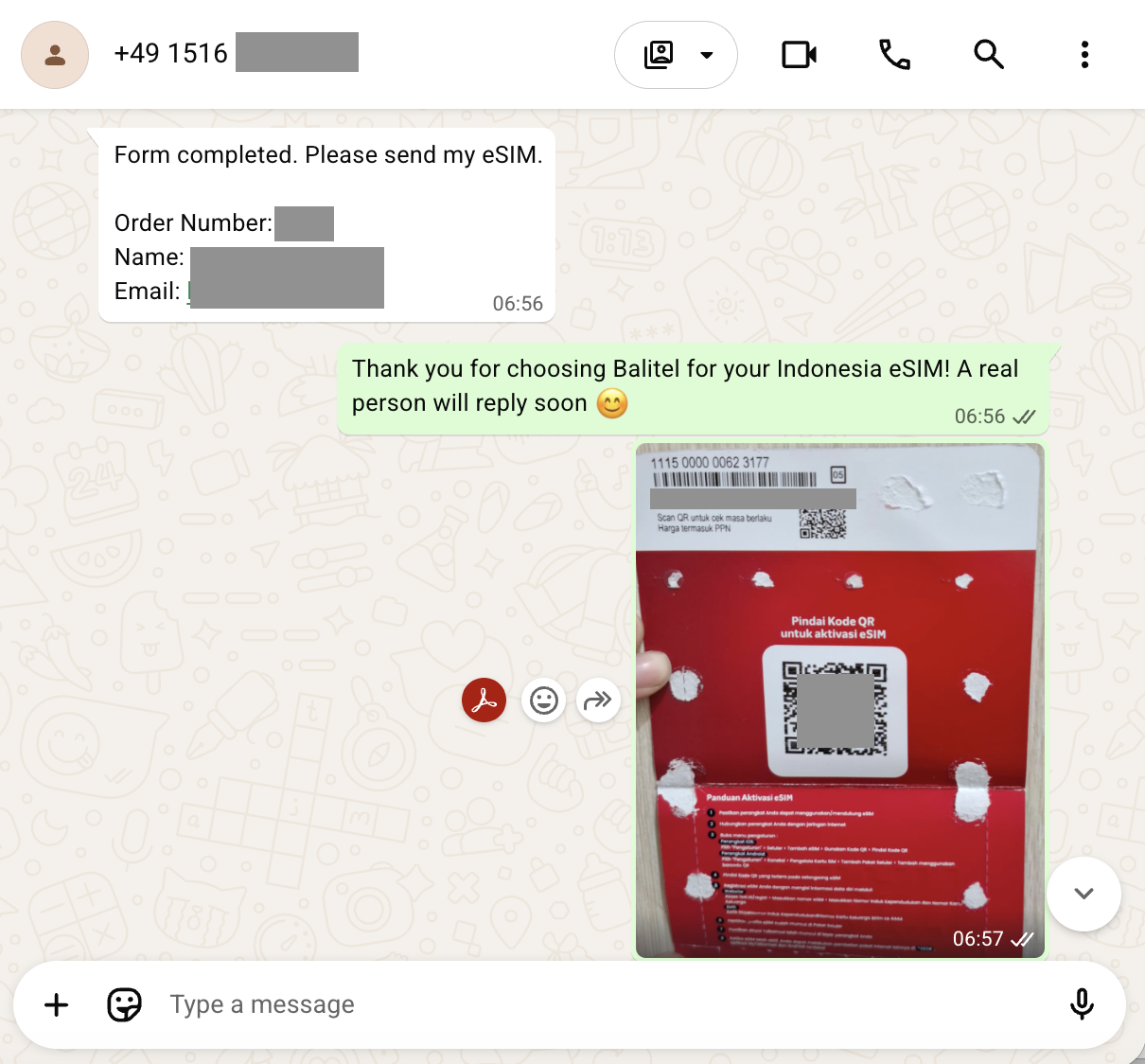
Once the form is submitted, message Balitel on WhatsApp with your order number, name and email. An auto-reply confirms a real person will respond. Within minutes you’ll receive a photo of a Telkomsel eSIM card with your QR code.
Step 4: Install the eSIM over Wi-Fi
Scan the QR code to add the eSIM. The printed instructions on the card are in Indonesian, so use these instead:
- iPhone: Settings > Mobile Service > Add eSIM > Use QR Code
- Android: Settings > Connections > SIM manager > Add eSIM
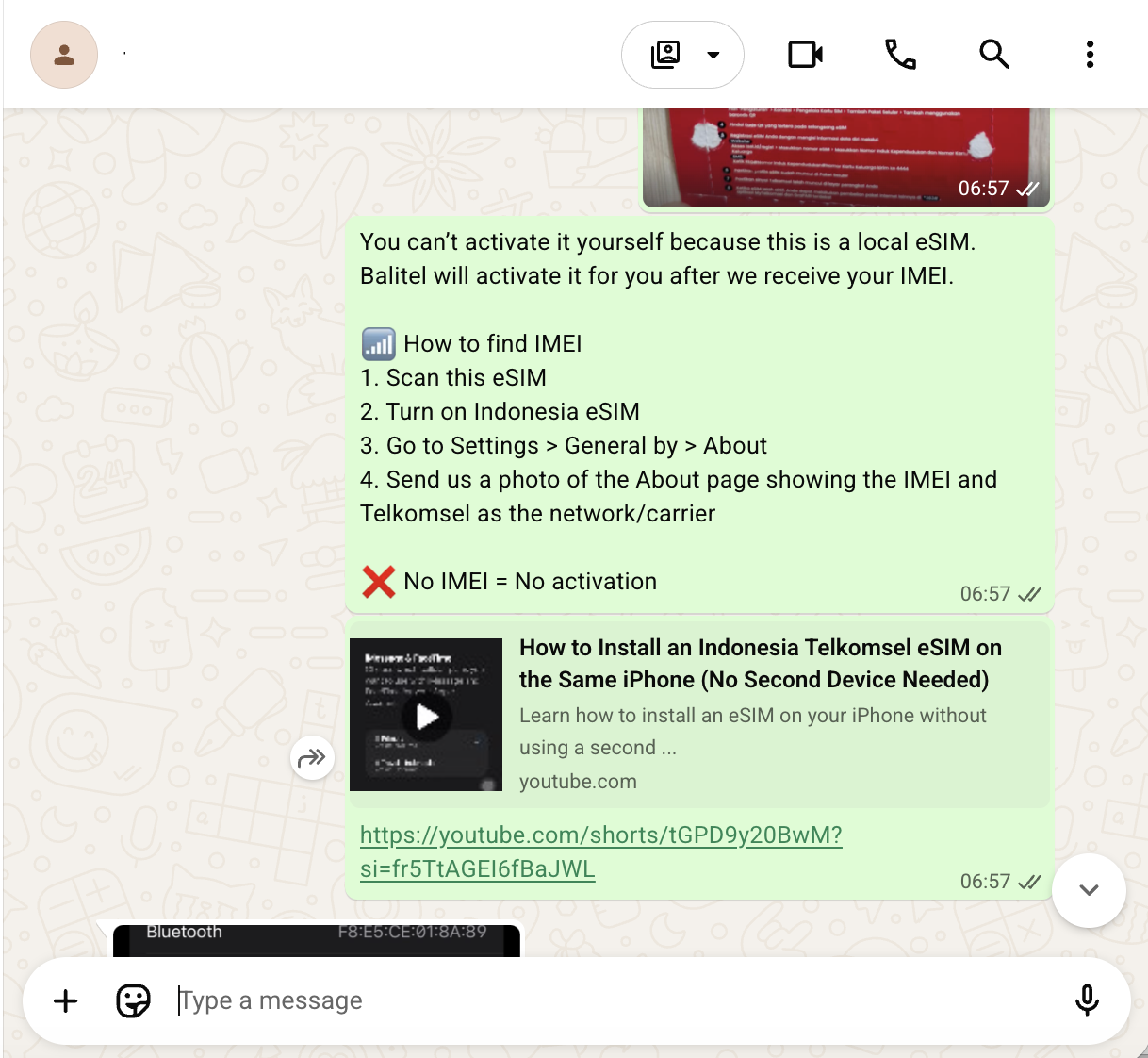
Only have one phone? Balitel sends a short video showing how to install the eSIM from the QR image on the same iPhone, with no second device needed.
Installing isn’t the same as activating. You can’t switch the line on yourself; Balitel does that once your IMEI is registered.
Step 5: Send Balitel your IMEI screenshot
Turn on the new Indonesia eSIM line, then go to Settings > General > About. Scroll to the eSIM section and screenshot the page showing your IMEI and Telkomsel as the network or carrier. Send it to Balitel on WhatsApp. No IMEI, no activation.
Step 6: Balitel activates your line on arrival day
Balitel registers your IMEI with the government and switches the line on during your arrival day, even before you land. You’ll get a WhatsApp message saying your eSIM is active and asking you to restart your phone.
Step 7: Restart and confirm your number
Restart your phone, then dial *363*820# and press call. A message pops up showing the area your number is registered to, such as Denpasar. Screenshot it and send it to Balitel as final confirmation. You’re connected, with a working +62 number for Gojek and Grab.
Already in Indonesia? Activation takes about 10 minutes.
Bali eSIM prices: what Balitel costs
The popular 20GB plan is US$18 for 30 days, or US$16.20 with code DREWDEAL.
| Plan | Days | Price (US$) | With DREWDEAL (US$) |
|---|---|---|---|
| 10 GB | 30 | 14 | 12.60 |
| 20 GB | 30 | 18 | 16.20 |
| 53 GB | 30 | 31 | 27.90 |
| 103 GB | 30 | 45 | 40.50 |
| 150 GB | 60 | 61 | 54.90 |
| 200 GB | 90 | 81 | 72.90 |
Prices from Balitel, checked 9 October 2026. You pay in Australian dollars at checkout.
Compare that with roaming: Telstra’s international day pass is A$10 a day, so two weeks costs A$140. Balitel’s 20GB plan covers 30 days for about a fifth of that.
Does a Bali eSIM work in the rest of Indonesia?
Yes. The full data allowance works anywhere Telkomsel has signal, not just Bali.
Balitel confirms coverage across Lombok, the Gilis, Java, Manado and Raja Ampat. Telkomsel has the widest network in Indonesia, which makes it the safest pick for island-hopping. As with any network, signal can thin out in very remote spots.
This matters because some other Telkomsel tourist eSIMs split the allowance, giving most of the data to Bali and only a few GB to the rest of the country.
What to know before buying a Bali eSIM
The trade-off for a local number is a little more paperwork than a travel eSIM.
- Passport and selfie. Indonesia’s communications ministry (KOMDIGI) requires every local SIM to be registered to a passport. The airport kiosks ask for the same thing. Balitel says it deletes your passport image after registration.
- Your phone must support eSIM. Dial
*#06#and look for an EID. Most iPhones from the XS onwards and recent Samsung and Pixel phones qualify. - Phone must be unlocked. A phone locked to an Australian carrier won’t take another SIM.
- Keep data roaming off for this line. It’s a local line, not a roaming one.
- Refunds. Full refund within 30 days if the line hasn’t been activated. Once your IMEI is registered, no refund.
- Support. WhatsApp, 8am to 2am Bali time. Sydney and Melbourne are 2 to 3 hours ahead of Bali depending on daylight saving; Perth is on the same time.
When Airalo is the better Bali eSIM
Airalo is still my pick for short, data-only trips. I use it myself.
- Stopovers and quick trips. A few days in Bali with Wi-Fi at the villa doesn’t need a local number.
- Multi-country trips. One Asia regional eSIM covers Indonesia and the next stop.
- No passport uploads. If sending your passport over WhatsApp makes you uneasy, Airalo installs with no ID.
Code DREWDEALNEW takes 15% off your first Airalo eSIM. See my Airalo deal page.
Bali eSIM FAQ
What is the best Bali eSIM with a phone number?
A Telkomsel tourist eSIM from an official reseller such as Balitel. Travel eSIMs like Airalo and Holafly are data only, with no Indonesian number.
How do I activate a Balitel eSIM?
You don’t activate it yourself. Install the QR code, send Balitel your IMEI screenshot, and they switch the line on for your arrival day.
Is Balitel a legitimate company?
Yes. Balitel is an official Telkomsel reseller with a shop at Jl. Raya Kuta No. 7, Tuban, and around 180 customer reviews on its site.
Can I use Gojek and Grab with a travel eSIM?
The apps work on any data connection, but sign-up codes come by SMS. A local +62 number is the reliable way to receive them.
When does my plan start?
On the day Balitel activates it, usually your arrival day. Buying weeks ahead costs you nothing.
Will I lose my Australian number?
No. Keep your Australian SIM on for WhatsApp and calls; use the Balitel line for data and local calls.
Does it work in Lombok and the Gilis?
Yes. The full allowance works anywhere on the Telkomsel network.
Why do they need my passport?
Indonesian law requires every local SIM to be registered to the user’s passport and phone IMEI.
Can I get a refund?
Yes, within 30 days, as long as the line hasn’t been activated.