
How to Gift an eSIM: A 5-Minute Secret Santa Gift Under $20

We earn a commission if you buy through our links, at no extra cost to you. We tested everything here ourselves.
I love secret santa and even more bad santa. Our family has matured over the years to the extent we have a no large pencils rule after a large pencil kept getting regifted year after year. Figuring out something everyone will love and try to steal, is easy to buy, has a bigger face value than actual cost, requires minimal wrapping, can be purchased at any amount and can be left to the last minute. What’s not to love. In fact my son Andy thinks this has solved all his current and future secret santa needs.
Here’s how to gift an eSIM in about five minutes, the one button you must not press, and what your Secret Santa (or Kris Kringle) budget buys.
Buying on Android, installing on an iPhone: the whole thing in under a minute.
The short version
- Buy the eSIM in the Yesim app, then tap Share eSIM (not Install).
- Send them the link, or print the QR code and put it in a card.
- It switches on when they land overseas, so it’s fine to give weeks before the trip.
- Code DREWDEAL takes 20% off at checkout.
Can You Gift an eSIM? Yes, in About 5 Minutes
Yes. An eSIM is just a digital SIM, so you can buy one on your phone and hand it to someone else to install on theirs. The catch is that it can only be installed once, on one phone, so it has to be shared before anyone installs it.
We tested this end to end: bought a Yesim eSIM on an Android phone, shared it, and installed it on an iPhone. From buying to working took about six minutes, and the person getting it didn’t need the Yesim app.
Why an eSIM Is a Unique Secret Santa Gift for Adults
- It’s useful. Anyone heading overseas needs data, and it saves them paying roaming.
- It’s unisex. No guessing sizes, tastes or whether they already have one.
- Any budget. Plans start around $4 and go well past $50.
- No wrapping, no shipping. A link in a message or a QR code in a card.
- Last-minute friendly. You can buy it five minutes before the gift swap.
The Golden Rule: Don’t Install the eSIM You’re Gifting
Two buttons to avoid
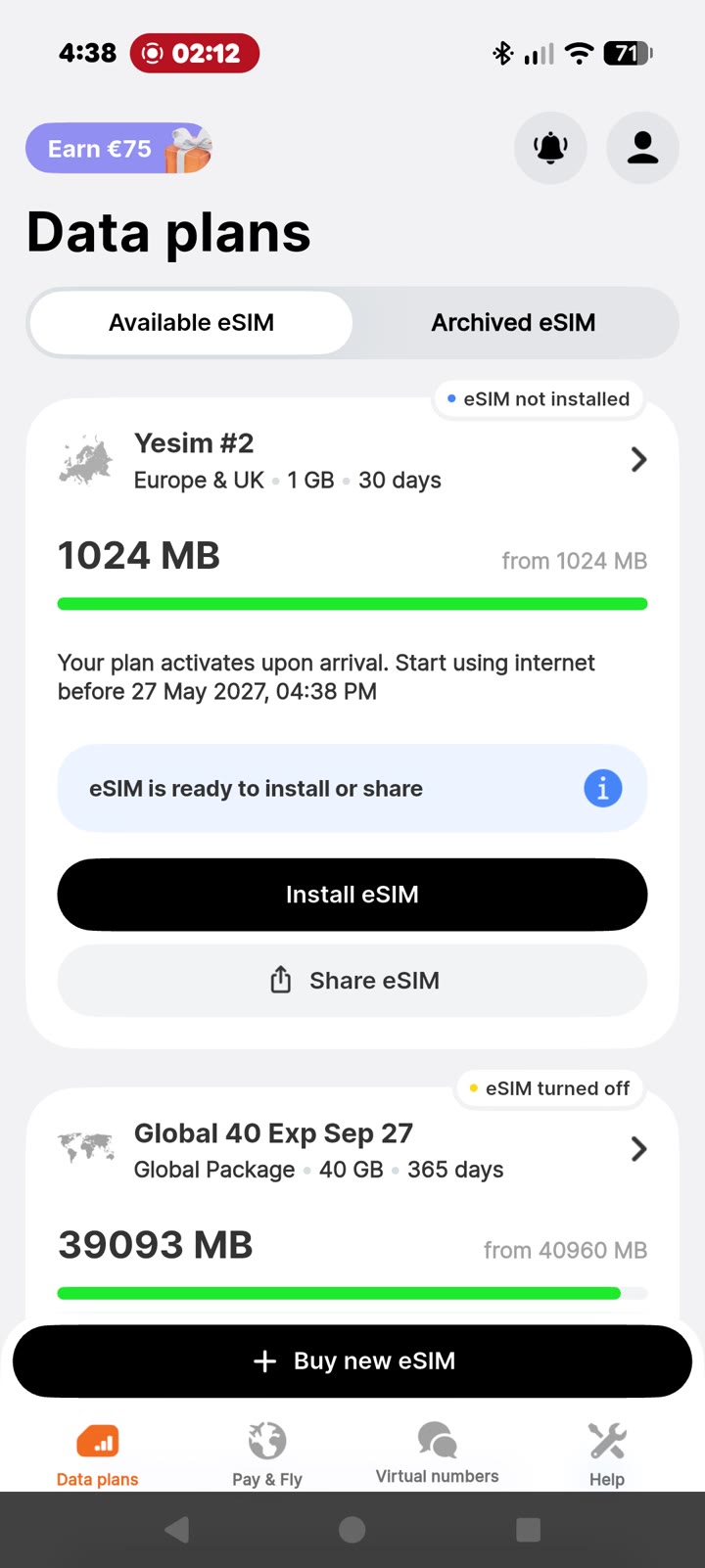
“Install eSIM”: tap this and it installs on your phone. The gift is gone. Yesim’s own email puts it plainly: an eSIM can be installed only once and only on one device.
“Choose this eSIM” at checkout: this loads the new plan onto an eSIM you already have, replacing your own plan. Tap “Create new eSIM” instead.
How to Gift a Yesim eSIM (Step by Step)
1. Pick the plan. Search for where they’re going (or choose Global if you don’t know) and pick the data amount. Skip the extras screen that follows.
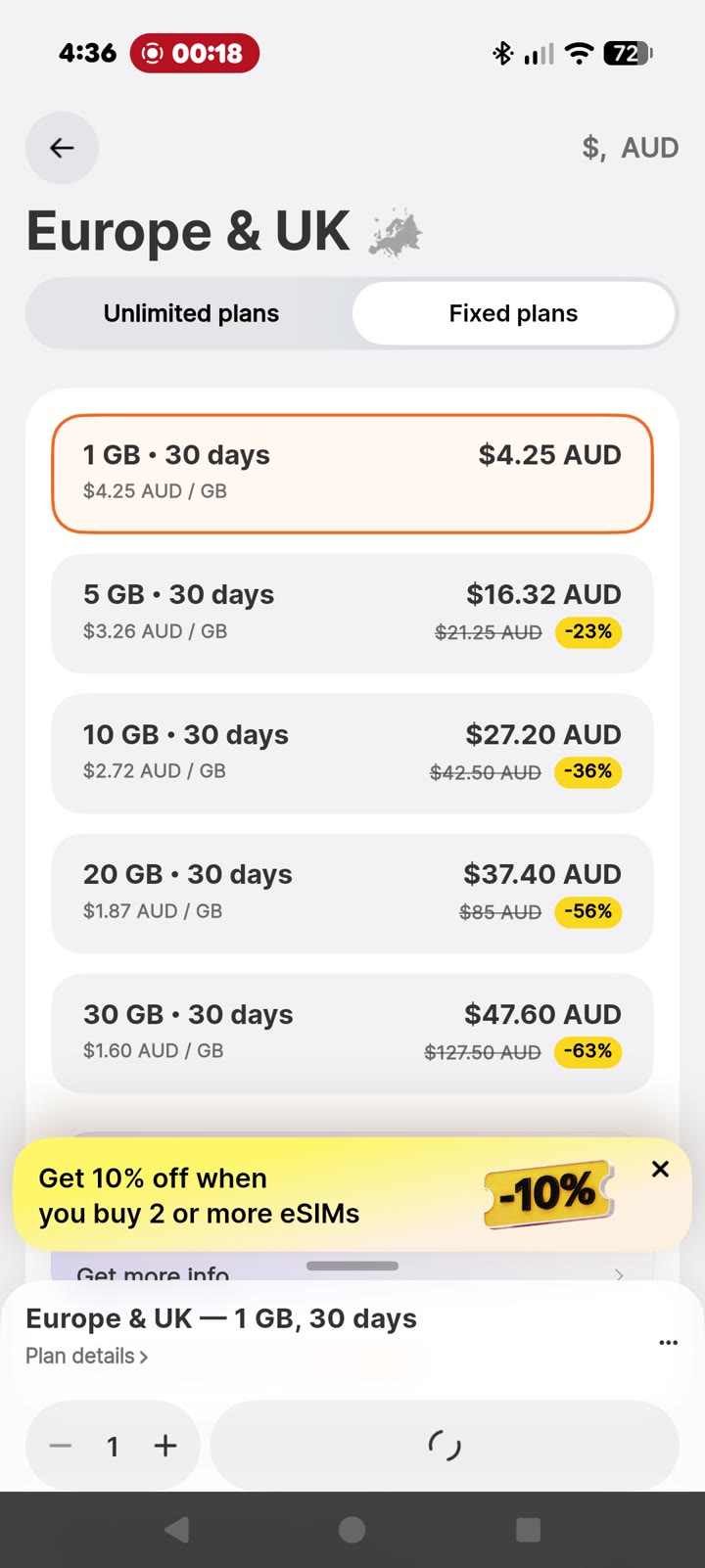
2. Check out. Enter DREWDEAL in the promo code box for 20% off.
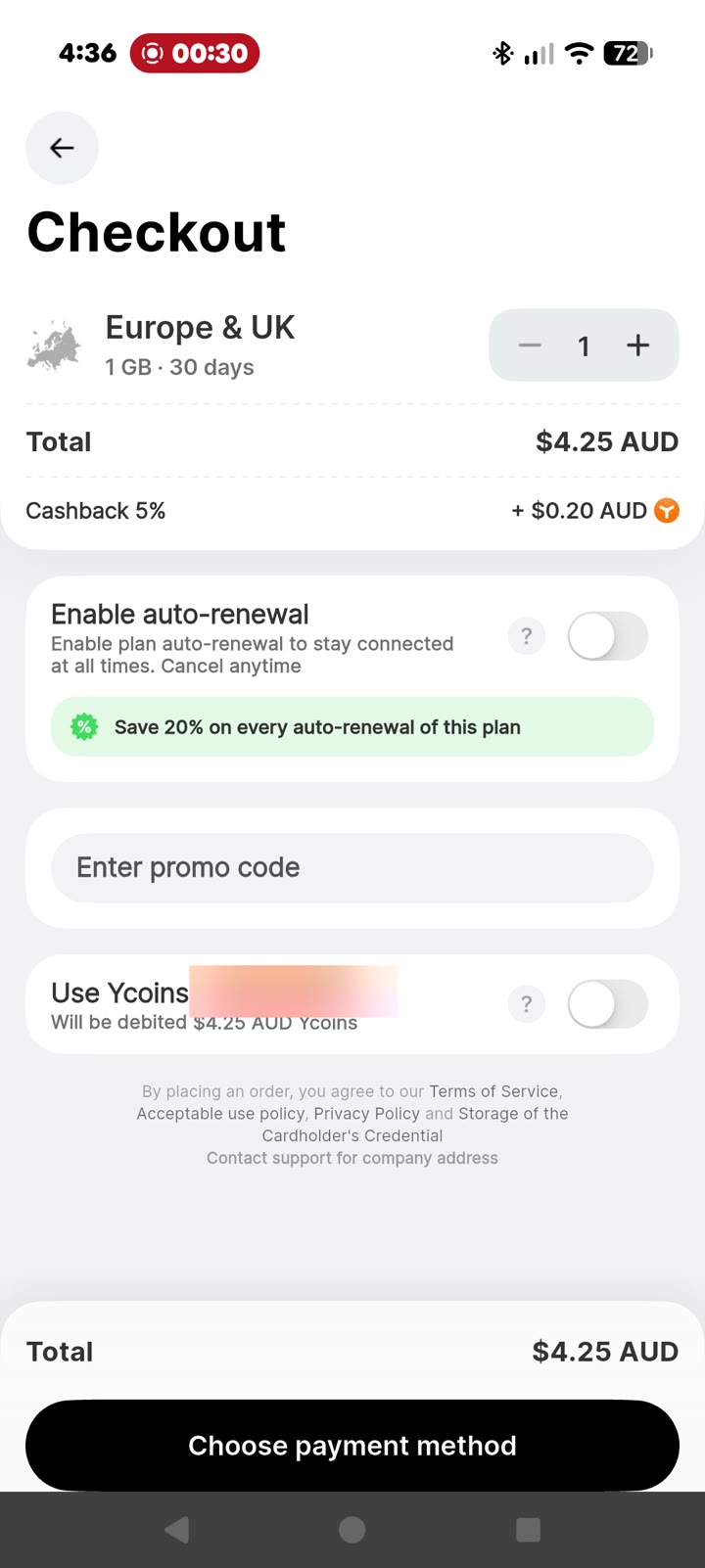
3. Tap “Create new eSIM”. Not “Choose this eSIM” (see the golden rule above).
4. Tap “Share eSIM”, not “Install eSIM”. The new plan sits in your Data plans list marked “eSIM not installed”.
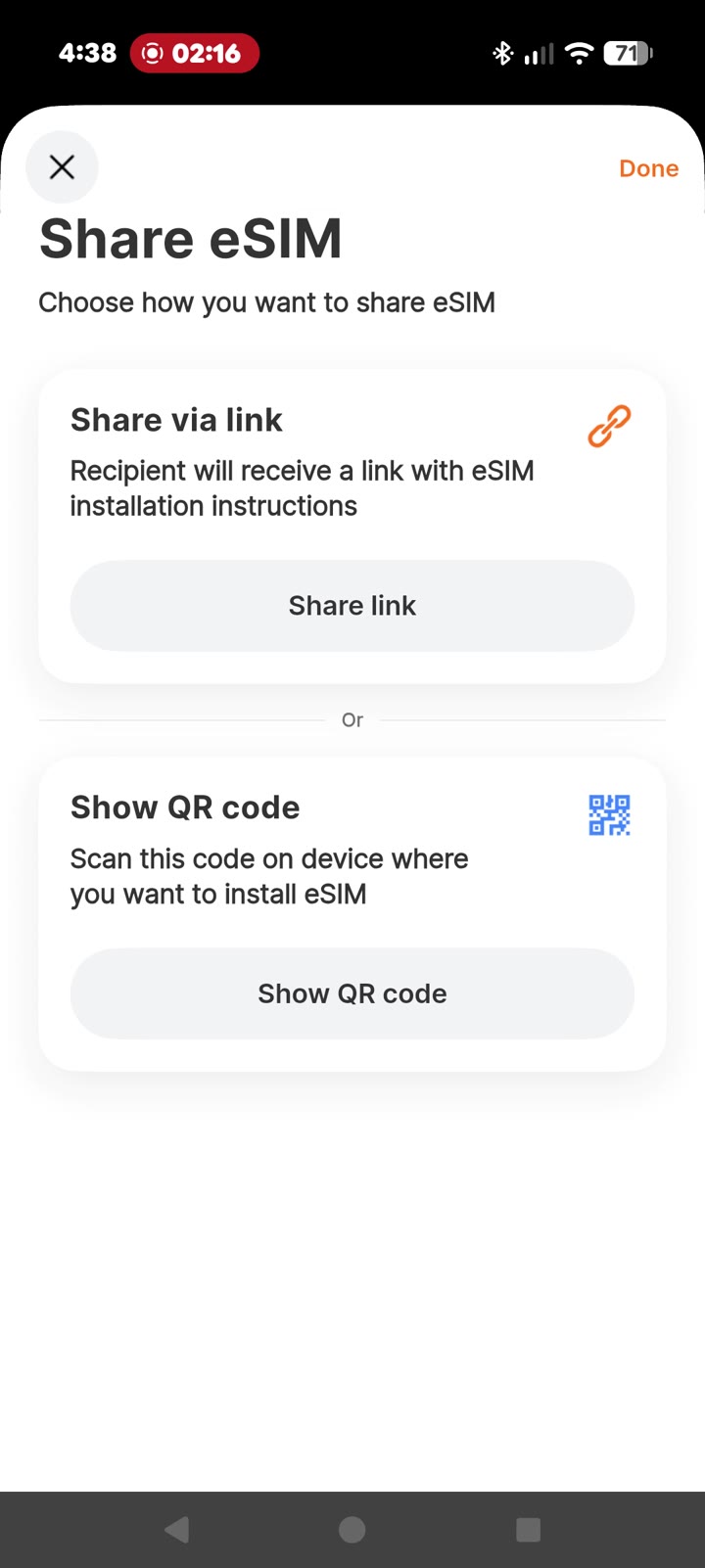
5. Send a link or show the QR code. “Share via link” sends them install instructions. “Show QR code” is for when you’re together, or when you want to screenshot or print it for a card.
Why we use Yesim for gifting
Not every eSIM provider makes gifting easy. Some make you forward emails or install codes, and one wrong tap on your own phone uses up the eSIM. We tested Yesim end to end (bought on Android, installed on an iPhone) and its Share button worked first time, with no app needed on the other end. That’s why it’s the one we recommend for gifting.
Last-Minute Kris Kringle: Print the eSIM Email
Kris Kringle starts in five minutes and you’ve got nothing? Buy the eSIM, don’t install it, and print the order email. Yesim sends a “Your eSIM is ready to install” email with everything the recipient needs:
What’s in the Yesim email (example)
- The QR code to scan
- A one-tap install link for iPhone
- A manual activation code to type in if the QR code won’t scan
- Step-by-step setup instructions
Fold it into a card and write “Don’t scan this until you’re home on wifi” on the front. Anyone who sees the QR code or activation code can use it, so don’t post a photo of it.
What Your Friend Does to Install the Gifted eSIM
On an iPhone it’s four taps, and no app is needed:
- Point the iPhone camera at the QR code (or tap the link) and tap Mobile Plan.
- Tap Activate and wait a few seconds.
- Choose Abroad, then Data Only.
- Tap Done. The Yesim line now shows in Settings, Mobile.
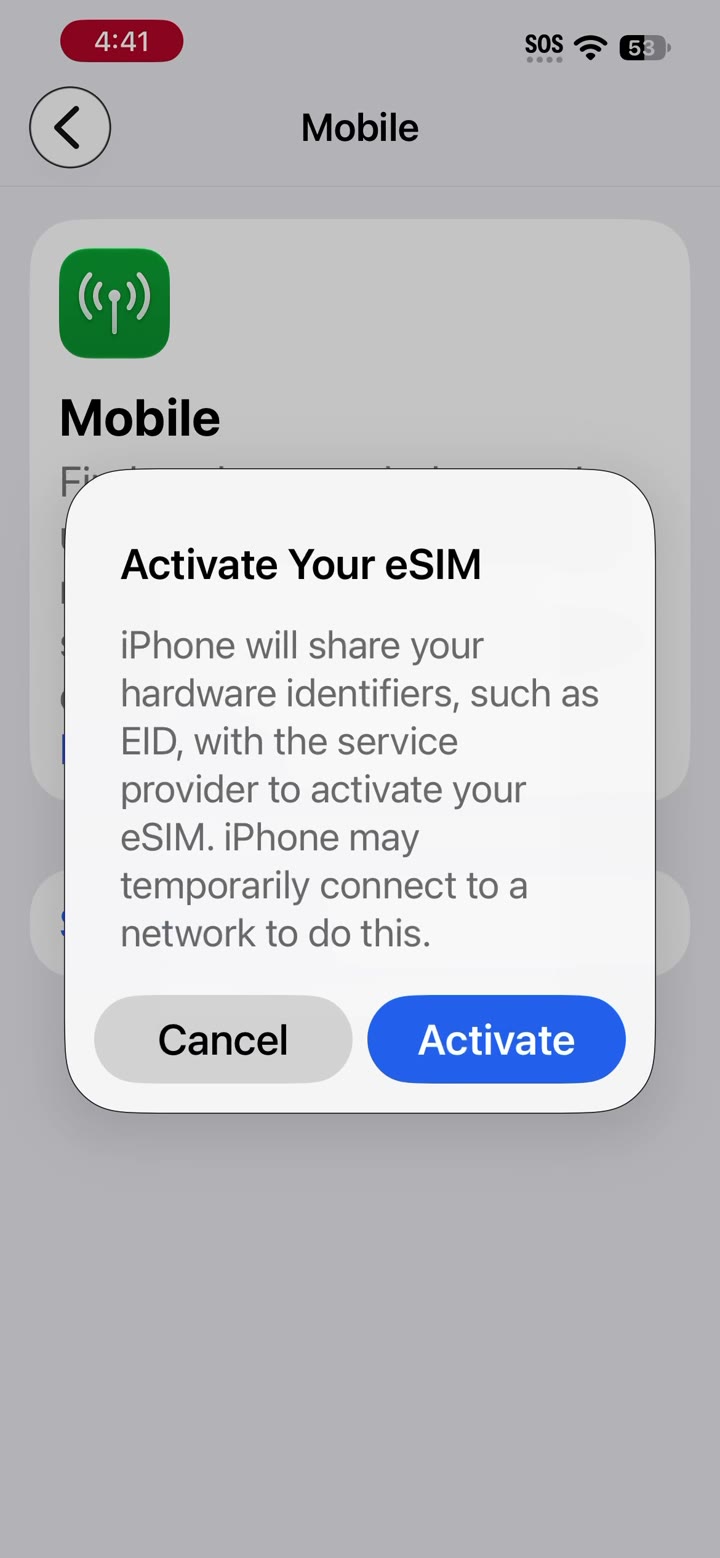
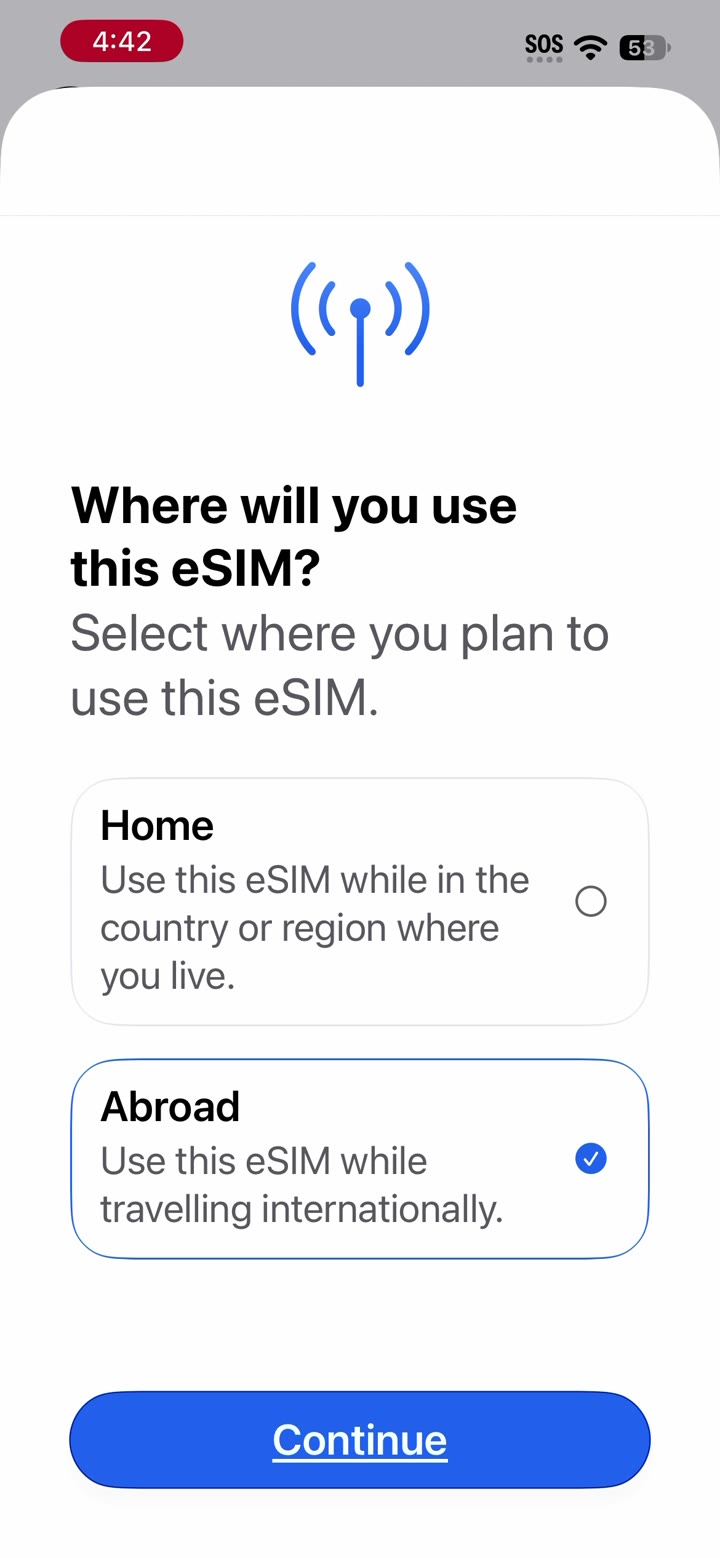
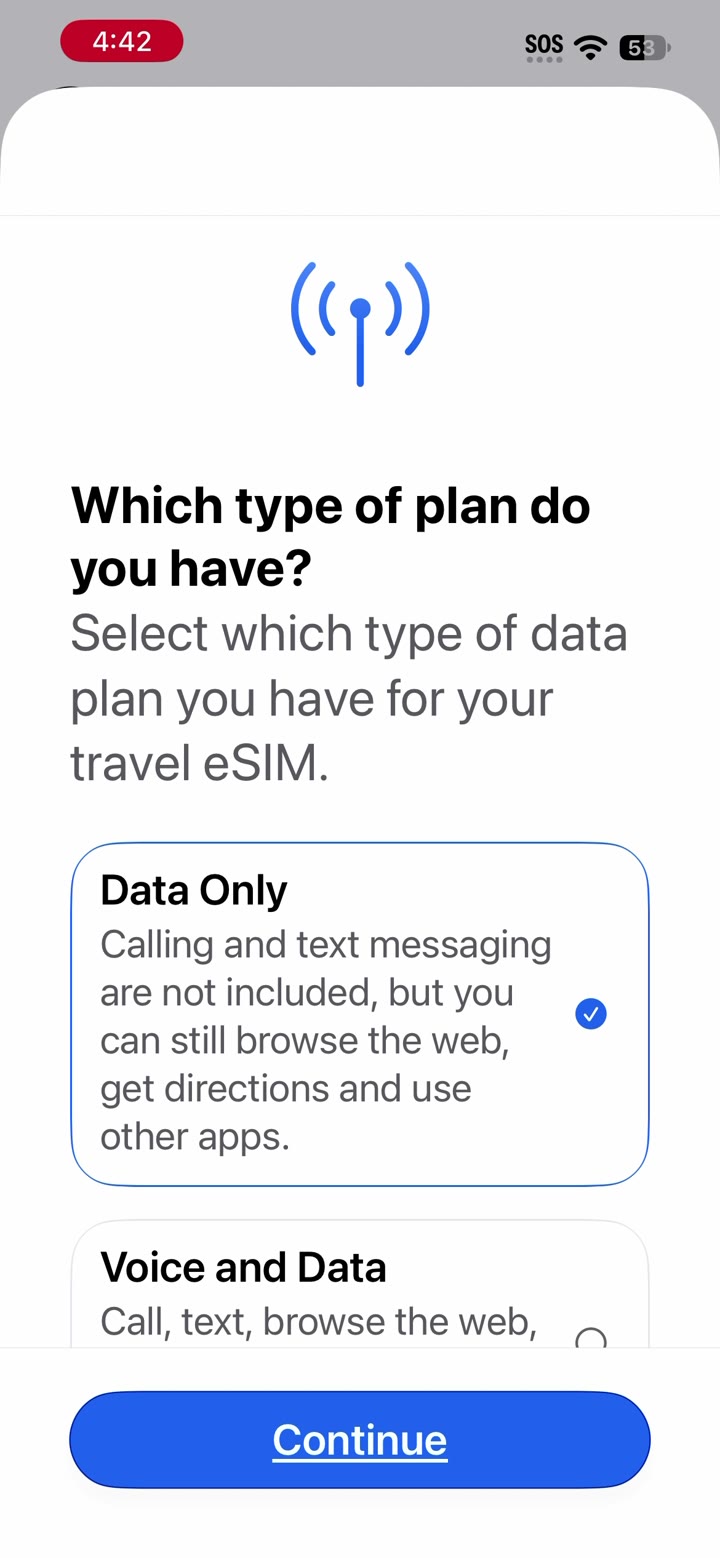
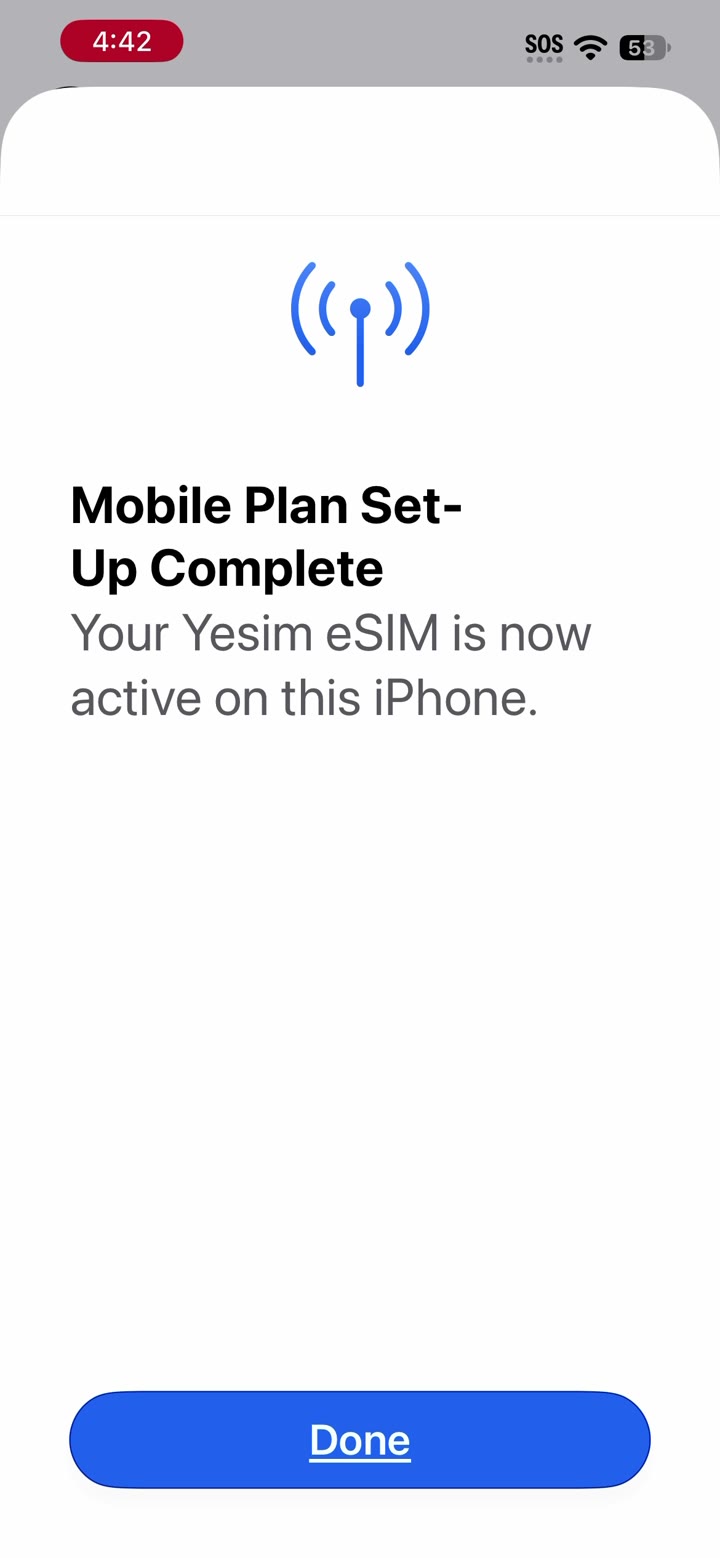
Best done at home on wifi before they fly. When they land, they turn on the Yesim line and Data Roaming for it, and turn off “Allow Mobile Data Switching” so they don’t get charged on their home number. Yesim’s plan starts on arrival, not on install.
A Christmas Gift Under $20: eSIM Options
For a $20 Secret Santa, 5 GB covers a week or two of maps, messages and socials:
- Europe & UK, 5 GB / 30 days: $16.32 ($13.06 with DREWDEAL)
- Asia, 5 GB / 30 days: $17.00 ($13.60 with DREWDEAL)
- Stocking filler: Europe & UK 1 GB for $4.25
$50 Secret Santa Gift Ideas: Go Big on Data
- Europe & UK, 30 GB / 30 days: $47.60
- Global, 10 GB / 30 days: $49.30 (works in most countries, so it’s the pick when you don’t know where they’re going)
- With DREWDEAL: Asia 20 GB for $40.53, or Global 10 GB for $39.44
| Yesim plan | Price | With DREWDEAL* |
|---|---|---|
| Europe & UK 5 GB / 30 days | $16.32 | $13.06 |
| Europe & UK 10 GB / 30 days | $27.20 | $21.76 |
| Europe & UK 30 GB / 30 days | $47.60 | $38.08 |
| Asia 5 GB / 30 days | $17.00 | $13.60 |
| Asia 20 GB / 30 days | $50.66 | $40.53 |
| Global 10 GB / 30 days | $49.30 | $39.44 |
| Global 20 GB / 90 days | $66.30 | $53.04 |
AUD, prices as shown in the Yesim app when we checked. Prices change, so check the app. *DREWDEAL: 20% off, entered at checkout.
Buy It on Sale, Give It at Full Value
This is the “bigger face value than actual cost” bit. A Global 10 GB plan is a $49.30 gift. With DREWDEAL it costs you $39.44. They still get every gigabyte. Nobody has to know, and it’s no different from buying anything else on special.
The Gift Everyone Steals: eSIMs for Bad Santa and White Elephant
In Bad Santa (or White Elephant, or Yankee Swap) the good gifts get stolen and the large pencil goes home with someone unlucky. An eSIM is the one that gets stolen, usually by whoever has a January trip.
Two tips for a swap game:
- Buy Global. You don’t know who’ll end up with it, so pick a plan that works almost anywhere.
- Write “don’t install until home” on the card. If someone scans it in the middle of the game, it’s theirs for good.
Can You Gift an eSIM From Other Providers?
Most eSIM providers let you buy an eSIM and forward the QR code or install details, even without a dedicated gift button. The same rule applies everywhere: don’t install it on your own phone first. For more options, see our best eSIMs for Australians and current eSIM deals.
Before You Gift an eSIM: 4 Quick Checks
- Does their phone take an eSIM? Most iPhones from the XS onwards and recent Samsung and Pixel phones do. It also needs to be unlocked.
- Where are they going? A country or regional plan is cheaper. If you don’t know, buy Global.
- When does it start? Yesim plans start on arrival, so you can give it early. Other providers may start the clock on install.
- How much data? 5 GB suits a short trip; heavy users and longer trips want 20 GB or more. Our guide to how much eSIM data you need helps.
Gifting an eSIM: FAQs
Is an eSIM a good Secret Santa gift?
Yes, for anyone with a trip coming up. It’s unique, unisex, needs no wrapping, and fits any budget from about $4 to $50 and beyond.
What eSIM can I get for $20 or $50?
Around $20 gets 5 GB for Europe & UK or Asia. Around $50 gets 30 GB for Europe & UK or 10 GB Global. See the table above.
What if I don’t know where they’re going?
Buy a Global plan. It costs more per gigabyte, but it works in most countries.
Does an eSIM work as a Bad Santa or White Elephant gift?
Very well. Buy Global, don’t install it, and print the QR code for the card.
Does the person need the Yesim app?
No. In our test the iPhone installed it straight from the camera. The app is handy for checking data later, but it isn’t required.
What if the QR code won’t scan?
They can type in the manual activation code from the Yesim email, or use the one-tap link on an iPhone.
What if they install it early?
That’s fine with Yesim: the plan starts when they arrive overseas, not when it’s installed.
Can I get a refund if they don’t use it?
Check Yesim’s terms before you buy. Refund rules vary, especially once an eSIM has been installed.
Does a gifted eSIM give them a phone number?
No, travel eSIMs like these are data only. They keep their own number for calls and texts. Our guide to keeping your Australian number active overseas explains how.
How do I use the DREWDEAL code?
Type DREWDEAL into the promo code box at checkout, before you pay. It takes 20% off the plan.
SECRET SANTA SORTED
Buy it. Share it. Don’t install it.
Get a Yesim eSIM: 20% off with DREWDEAL →Enter DREWDEAL in the promo code box at checkout.