

Updated August 23, 2025 by Drew

That family holiday to Fiji is finally within reach, but your partner is 5,000 points short. As our family’s unofficial ‘points banker’, this is a problem I solve all the time. The solution is the Qantas Family Transfer, a feature that lets you pool points for bigger rewards.
But with Qantas’s recent devaluations making every point count, the rules can be tricky. It’s clear many Aussies are confused, and getting it wrong can be a costly mistake. This guide breaks down the 2025 rules step-by-step, including the pitfalls, pro-level alternatives, and how a tool like Points Maximiser can truly supercharge your family’s travel strategy.
Why Bother? The Top 3 Reasons to Use Family Transfer
Qantas Family Transfers let you move points between accounts for free, unlocking rewards that might otherwise be out of reach. Here’s why it’s a core strategy for any points-savvy family:
- Pool Points for Big Rewards: Combine your family’s smaller point stashes to book a major reward, like a Business Class flight to Europe—especially useful post-devaluation where higher balances are needed.
- Save a Family Member’s Points from Expiring: If a family member’s points are about to expire due to 18 months of inactivity, receiving a Family Transfer counts as activity on their account and resets the clock on their entire balance.
- Top-Up for a Specific Flight: If someone’s just shy of an award flight (e.g., 8,000 points for a Sydney-Melbourne Economy ticket), a quick transfer from another family member can seal the deal instantly.
The Rules: Who Can Transfer and Who Can Receive?
Any Qantas Frequent Flyer member can send points, but only to “eligible family members” who are also part of the program. Qantas is strict about this relationship, so it’s important to know who qualifies.
| Relationship | Examples |
|---|---|
| Spouse/De Facto/Domestic Partner | Husband, Wife, Partner |
| Parents/Step-Parents | Mother, Father, Step-Mother |
| Children/Step-Children | Son, Daughter, Step-Son |
| Grandparents/Grandchildren | Grandmother, Grandson |
| Siblings/Half-Siblings | Brother, Sister, Half-Brother |
| In-Laws | Father-in-Law, Son-in-Law, Brother-in-Law |
| Extended Family | Uncle, Aunt, Nephew, Niece, First Cousin |
Note: Qantas may ask for proof of relationship, so be prepared to verify your connection if requested.
The “How-To”: A Step-by-Step Guide to Transferring Points
Can You Transfer Points in the Qantas App?
It’s a common question, but as of August 2025, the Family Transfer feature is not available in the Qantas Frequent Flyer mobile app. You can check your balance and manage bookings, but you cannot initiate a points transfer from the app itself.
To transfer points, you must log in to the full Qantas website using a web browser on your computer or phone.
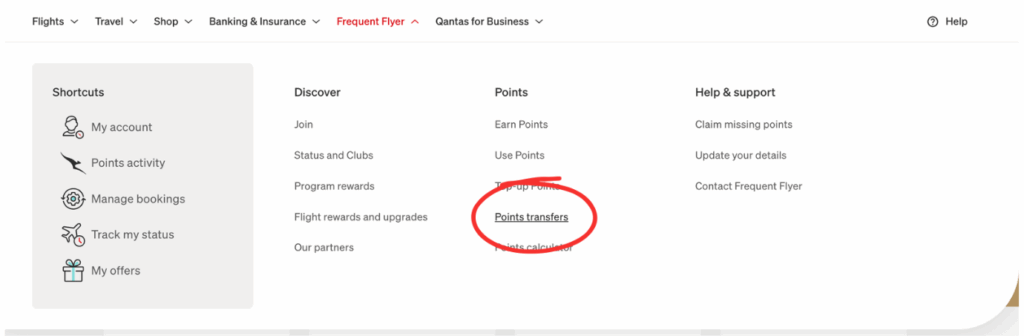
Step-by-Step Guide (Using the Website)
- Log in to your Qantas Frequent Flyer account at qantas.com.
- Navigate to the Family Transfer page (you can find it under the “Your Account” section).
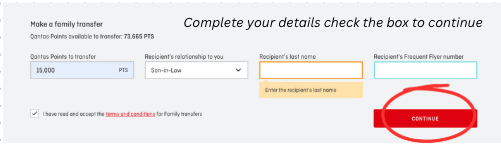
- Enter the recipient’s Frequent Flyer number, last name, their relationship to you, and the number of points you wish to send.
- Confirm the transfer with the security code Qantas sends to your phone. The points usually appear in the recipient’s account instantly.
The Fine Print: Critical Limitations You MUST Know
- Transfer Limits: You can transfer a minimum of 5,000 points and a maximum of 600,000 points per transaction. The total points transferred from your account cannot exceed 600,000 in a 12-month period.
- No Status Credits: Transferred points are for rewards only. They do NOT count toward earning or retaining Silver, Gold, or Platinum status for the recipient.
- No Reversals: Once a transfer is done, it’s final. Double-check the details before you confirm.
- No Other Programs: You cannot transfer Qantas points to other airline programs like Velocity, or to credit card programs like Amex.
- Expiry Nuance: For the person sending, a transfer does not count as activity to stop their own points from expiring. For the person receiving, it does count as activity and will reset their 18-month expiry clock.
Strategic Alternative: Booking a Flight for Family Directly
You don’t always need to transfer. A simpler and often better strategy is to use your own points to book a flight for an eligible family member directly from your account.
- Pros of Booking Directly: It’s a simpler process and doesn’t affect your annual transfer limits.
- Pros of Transferring: It gives the recipient the flexibility to book for themselves, combine points with their own balance, or use them for an upgrade.
The Pro Move: Managing Your Entire Family’s Points with Points Maximiser
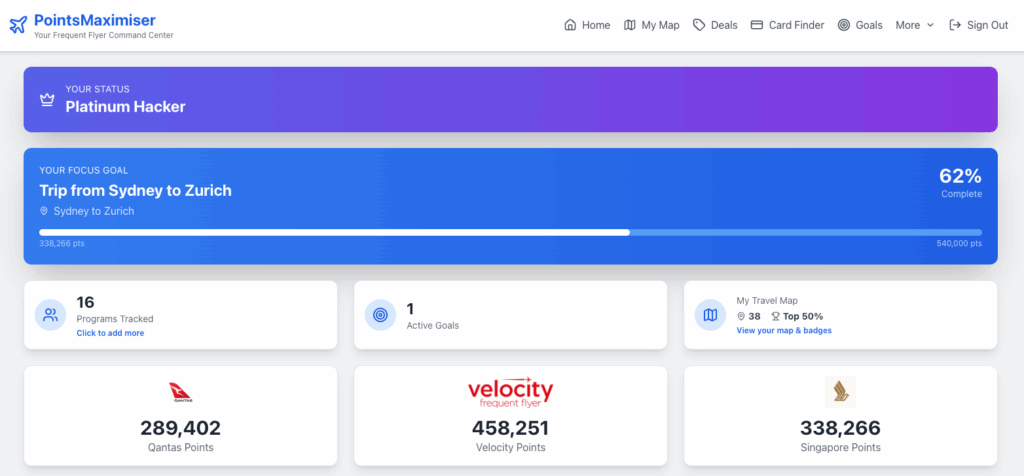
Transferring Qantas points is a great tactic, but a successful family points strategy requires seeing the bigger picture—across Qantas, Velocity, Amex, and more.
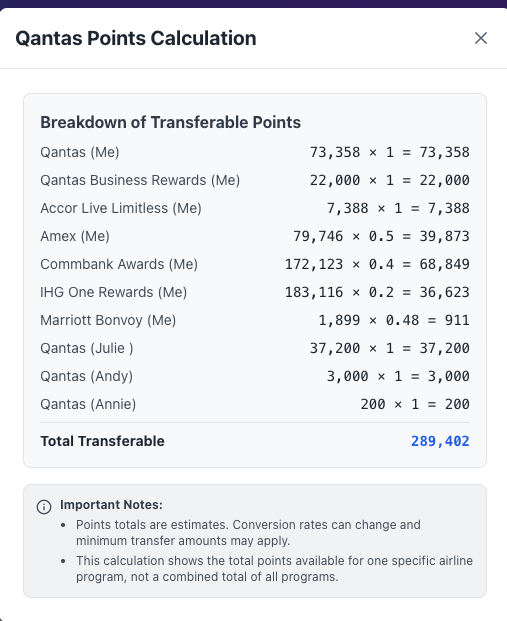
The problem: It’s easy to lose track. You might transfer your valuable Qantas points without realizing your partner had a stash of Amex points that could have been converted instead.
The solution: Points Maximiser is your family’s command center. You can add family members in the settings to view all your balances in one simple dashboard. This gives you a holistic view of your family’s total travel potential and helps you make the smartest decision every time. Its in Beta so join now or get on the waiting list.
Qantas Family Transfer FAQ
Here are answers to the most common questions people ask about family transfers.
Can you transfer Qantas Points to a family member?
Yes, you can transfer points to any eligible family member for free. The transfer is usually instant.
How much are 100,000 Qantas Points worth?
The value varies. For an economy flight, it’s roughly $1,000-$2,000. For a Business Class flight, that same 100,000 points could be worth over $5,000.
Can you transfer Qantas flight credits to family members?
No. Qantas flight credits from cancelled bookings are tied to the original passenger and cannot be transferred.
Can you transfer Qantas Points to a non-family member?
No, this is strictly against the Qantas Frequent Flyer terms and conditions and could put your account at risk of being suspended.
How long does it take to transfer Qantas points?
In most cases, the transfer is processed instantly and the points appear in the recipient’s account within minutes.
Final Verdict
The Qantas Family Transfer is a powerful and free tool for any points-collecting family. It’s the perfect way to pool your points for a major holiday, save a balance from expiring, or cover a small shortfall for a quick trip.
But the real pro move is to go beyond simple transfers and manage your family’s entire points portfolio. For that, a tool like Points Maximiser is essential to track all your balances, see the big picture, and turn your fragmented points into unforgettable family memories.