

Planning a family adventure on the slopes but your Velocity points are spread across multiple accounts? Velocity Frequent Flyer offers two powerful features to combine your points: Family Pooling and Family Points Transfers, making that ski trip a reality sooner. However, most people don’t realise they are two very different tools, each with its own specific purpose and rules.

Getting it right is the key to unlocking the best value, especially with recent program changes. As our family’s ‘points banker’, I use both features strategically to maximize every point and Status Credit earned.
This definitive 2025 guide will break down the difference between Pooling and Transfers, show you exactly how to set them up, and reveal how to use them for maximum benefit—all while using a tool like Points Maximiser to keep track of it all.
In this post:
Feature 1 Explained: What is Velocity Family Pooling?
Family Pooling is a long-term strategy. It allows you to automatically channel all future Points AND Status Credits from up to five other family members living at the same address directly into one beneficiary’s account. Any points or status credits they already have in their account will not be transferred.
Best for: Fast-tracking one person to a higher status tier (e.g., Gold or Platinum) so the whole family can enjoy the benefits, like lounge access, priority boarding, and extra baggage.
Feature 2 Explained: What are Velocity Family Points Transfers?
Family Points Transfers are for one-off situations. This feature allows you to manually transfer a portion of your existing points balance to a broader group of family members. You can only transfer points, not Status Credits.
Best for: A quick, ad-hoc top-up. For example, if your son is 5,000 points short for a reward flight, you can instantly transfer the points he needs from your account to his.
How to Set Up Pooling & Transfers
The setup process for both features must be done on the main Velocity website, not in the mobile app. Here’s how each process works.
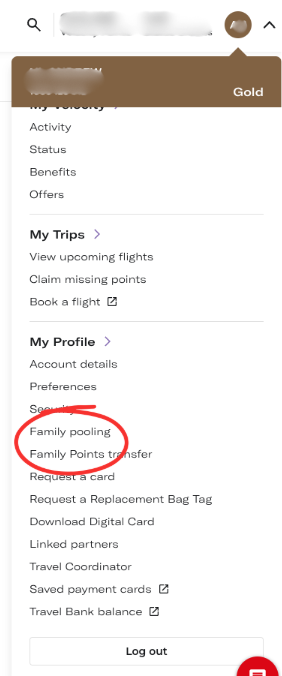
Setting Up Family Pooling (Initiated by the Contributor)
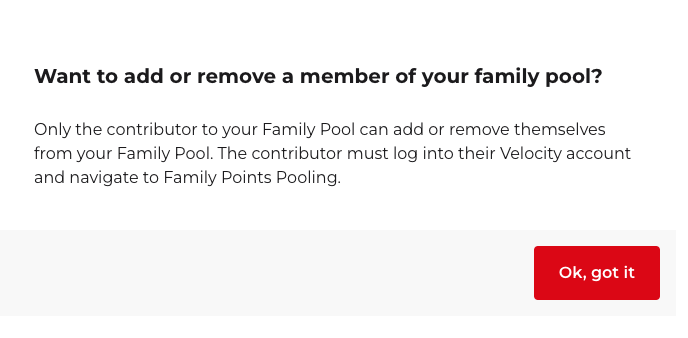
Crucially, a Family Pool must be set up by the person who wants to give their points (the contributor), not the person receiving them.
- The contributor logs into their own Velocity account.
- They navigate to the “My Profile” section and click the “Family pooling” link.
- From there, they can choose to add themselves to a beneficiary’s pool by entering the beneficiary’s name and Velocity number.
Making a Family Points Transfer (Initiated by the Sender)
- The person who wants to send their existing points logs into their Velocity account.
- They navigate to “My Profile” and click the “Family Points transfer” link.
- Follow the prompts to choose an eligible family member and the amount of points you wish to send.
Important Update (August 2025)
As per the Velocity website, the online Family Points Transfer service is temporarily offline. To make a transfer, you must call the Membership Contact Centre on 13 18 75 in Australia. The usual fee for phone transfers is being waived during this period.
Pro-Tip: Track Your Pool in the App
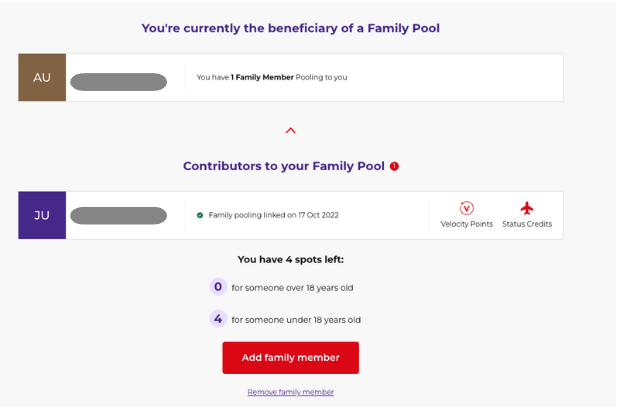
While you can’t set up pooling in the Velocity app, you can view and track your existing Family Pool status. This is a handy way for the beneficiary to see who is contributing to their account on the go.
The Ultimate Comparison: Pooling vs. Transfers vs. Qantas
This table breaks down the crucial differences between Velocity’s two features and how they compare to Qantas.
| Feature | Velocity Family Pooling | Velocity Family Transfer | Qantas Family Transfer |
|---|---|---|---|
| What You Can Share | Points & Status Credits | Points Only | Points Only |
| What is Moved? | All future earnings are automatically swept. | A portion of your existing points balance. | A portion of your existing points balance. |
| Household Requirement? | Yes, all members must live at the same address. | No, family members can live anywhere. | No, family members can live anywhere. |
| Limits | No limit on points/SC pooled. Up to 6 members in a pool. | 4 transfers per year. Max 125,000 points per transfer. | Account capped at sending 600,000 points per year. |
| Best For | Earning elite status for family-wide benefits. | One-off top-ups for a specific reward. | One-off top-ups for a specific reward. |
Pro-Tip: The Ultimate Double Dip
My wife has linked her 7-Eleven and Flybuys accounts to her Velocity account. Because she is in my Family Pool, whenever she fills up the car with petrol or shops at Bunnings, her points are automatically swept to my account. I also get the points from the credit card used for the purchase. It’s the ultimate double dip and a perfect, passive way to build a massive family points balance.
The Pro Move: Managing Your Entire Family’s Points
Velocity’s family features are powerful, but your family’s points are likely scattered across Qantas, Amex, and other programs too. Tracking it all is the biggest challenge.
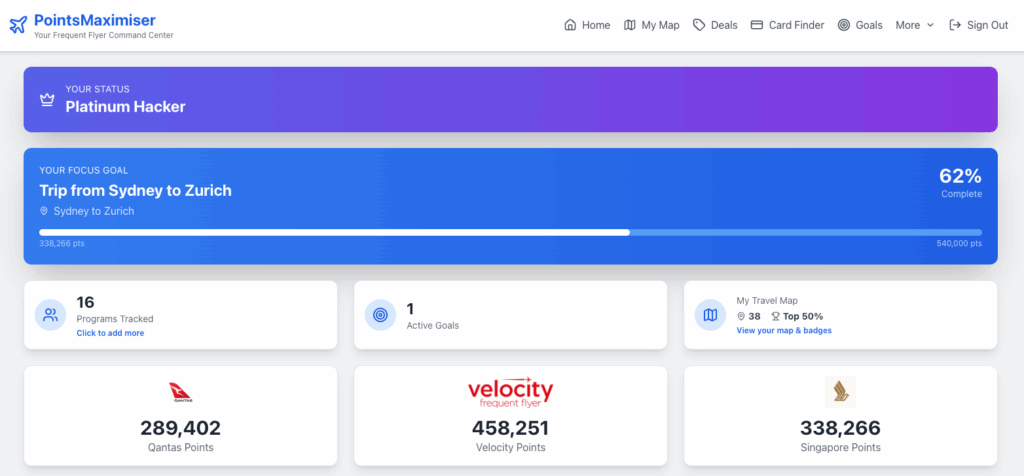
The solution: Points Maximiser is your family’s command center. It aggregates all your points in one dashboard, giving you a single source of truth to make the smartest decisions—whether that’s to pool, transfer, or convert points from another program entirely. Try the free beta version today or get on the waitlist.
Velocity Family Features FAQ
What’s the difference between Velocity Family Pooling and a Family Transfer?
Family Pooling is an ongoing, automatic process where all future points AND Status Credits from up to 5 family members (living at the same address) are swept into one account. It’s best for earning elite status. A Family Transfer is a manual, one-off transfer of your existing points (not Status Credits) to a broader range of family members, best for a quick top-up.
Is Velocity Family Pooling worth it?
Yes. It is one of the most powerful family features of any airline program because it allows you to pool Status Credits, which can help your family achieve valuable elite status much faster.
How does Family Pooling work?
Once set up, a contributor’s points and Status Credits are automatically swept to the beneficiary’s account as soon as they are earned and posted to the contributor’s account.
Can I transfer Velocity Points to a family member?
Yes, you have two options. You can use Family Pooling for an ongoing, automatic transfer of future points, or a Family Points Transfer for a one-off transfer of your existing points.
Do Velocity Points expire?
Yes, Velocity points expire after 24 months of no account activity. It’s important to note that Family Pooling or making a Family Transfer does not count as activity to stop points from expiring in the sender’s account.
Can I transfer Velocity Points to Qantas or Flybuys?
No, you cannot transfer Velocity Points directly to Qantas or Flybuys. However, you can transfer points the other way, from Flybuys into your Velocity account.
What do 100,000 Velocity points get you?
Approximately 100,000 Velocity points can get you a one-way Business Class flight from Sydney to Singapore, a return Business Class flight to Fiji or New Zealand, or multiple domestic upgrades.
Final Verdict
Understanding the difference between Velocity Family Pooling and Family Transfers is the key to a successful family points strategy. Use **Pooling** for your long-term goal of earning elite status and **Transfers** for short-term, one-off top-ups. For managing everything else across all your programs, a tool like Points Maximiser is essential to see the big picture. By combining these strategies, you can turn your family’s everyday spending into incredible travel rewards.