
Airalo’s New Install-Once eSIM: What Changes for Australian Travellers
We've switched to the new Airalo: one eSIM, installed once, then data for every trip. How to tell if you have it and what happens to your old eSIMs.

This is my phone’s SIM list. Seven entries: my Woolworths number, then six travel eSIMs. Two are labelled “unknown exp sept 21” and “maybe yesim #1”. I test eSIMs for this site and I still couldn’t tell you what’s on half of them.
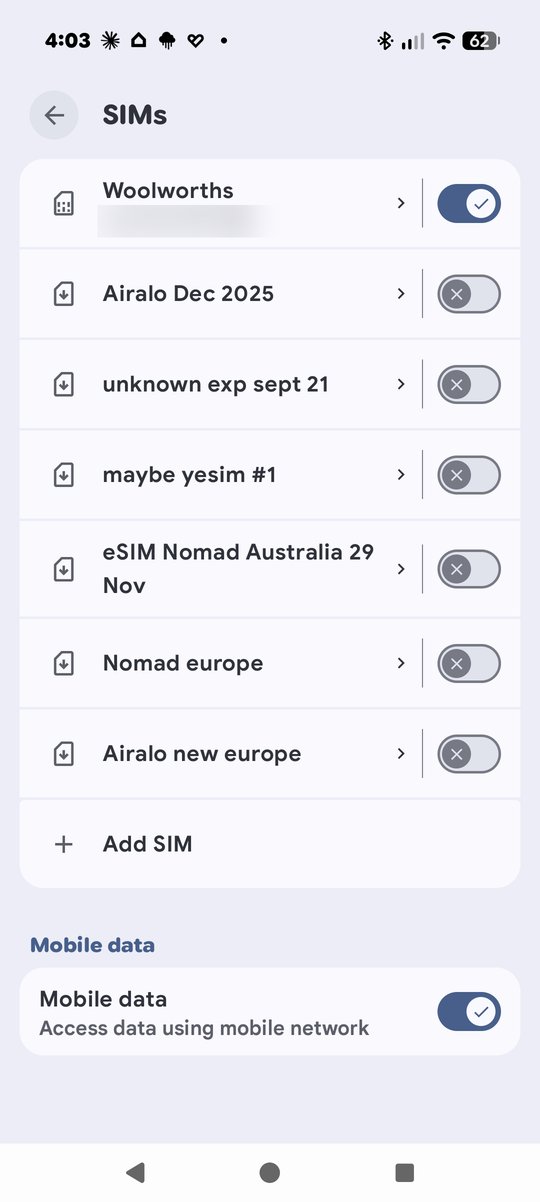
That’s how travel eSIMs have worked until now. Every trip, a new eSIM to install, rename and eventually delete. Get it wrong and you’re standing in an arrivals hall looking for Wi-Fi.
I know this is true. I once spent half an hour on the phone with a friend stuck at Milan airport, trying to work out which of two identically named eSIMs, for two different regions, to turn on.
Airalo has just fixed that, and we’ve switched over. With the new Airalo, you set up one eSIM on your phone, once. After that, every trip is just a data package you buy in the app. No reinstalling. No switching. From now on, life is easier.
Here’s what’s changed, how to tell if you’ve got it, and what happens to the eSIMs you already have.
Save on your first new-Airalo package
New to Airalo: DREWDEALNEW Tap to copy Get Airalo →
Existing customers: DREWDEAL Tap to copy Open Airalo →
Buying in the app? Airalo may suggest its own code at checkout. Swap it for ours if ours is the bigger discount. Small referral to us if you use our code. It doesn’t change your price.
What’s changed
The big change: one eSIM per phone, set up once, with data packages added to it whenever you travel. Airalo built its own core network to make this work, and is rolling it out to its 30 million-plus customers over the coming months.
| Old Airalo | New Airalo | |
|---|---|---|
| eSIMs on your phone | A new one for every trip or country | One, set up once |
| Each trip | Install a new eSIM | Buy a package in the app |
| Out of data abroad | Find Wi-Fi to buy more | Buy in the app even with no data |
| Deleted it by mistake | Usually gone for good | Retry setup on the same phone |
| App tab | My eSIMs | Packages |
The “buy with no data” part is the one travellers will love. The app still works when your data has run out, so you can buy a package, contact support or follow troubleshooting steps. It’s not free internet, just enough to get yourself back online.
What it doesn’t do yet: calls and texts. The new Airalo is data only. Packages also stay with the phone they were bought for. A new phone means setting it up again, and packages don’t move across.
How to tell if you’re on the new Airalo
Airalo is moving customers across by invitation. We got ours early, so most travellers won’t have one yet. Three ways to check:
- The invite email. Ours was headed “You’re in! Welcome to the new Airalo” and promised: set up your device once, use the same eSIM everywhere, and buy data even when you’re out of data.
- The app’s bottom menu. If it says Packages, you’re on the new Airalo. If it still says My eSIMs, you’re not, yet.
- The setup prompt. According to Airalo’s help centre, the new app asks you to “Just set up once and add data later”. (Ours went straight through, so we didn’t see it.)
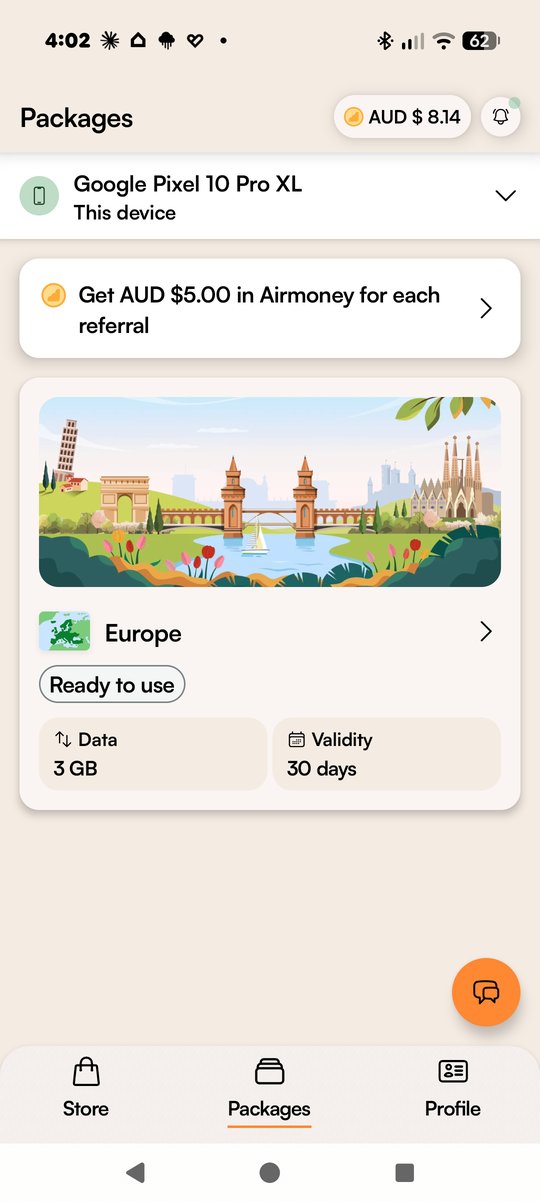
Not invited yet? Nothing to do. Your current eSIMs keep working exactly as before.
How we set it up
We set it up on a Google Pixel 10 Pro XL, straight from the Airalo app. No QR code to scan: with the app already on the phone, it handed over to Android and the eSIM installed itself. We filmed it:
The steps are the same on iPhone and Android. The app does the work, then your phone finishes the install:
- Connect to good Wi-Fi and set aside a few minutes.
- Update the Airalo app, open it and tap Get started or Set up your device.
- The app checks your phone supports eSIM.
- It hands over to iOS or Android to add the eSIM. Don’t close anything while it works.
- Back in the app, check your phone shows as set up under Packages.
Then buy a package before you go. Ours (Europe, 3GB for 30 days) shows Ready to use, with “Next to connect to network”. It sits there waiting and starts when the phone first connects in Europe.
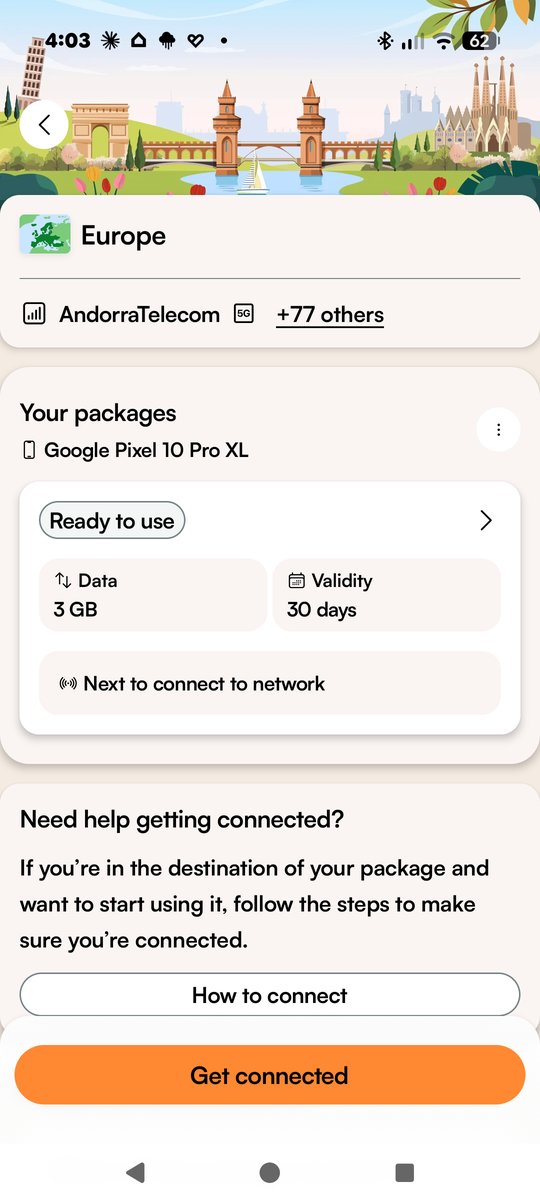
Do the setup at home on Wi-Fi, not at the airport. The new system also lets you check the connection before you leave, so you’re not crossing your fingers in arrivals.
If setup fails, you can retry it on the same phone as many times as you need (Device Options, then “Retry device setup”). Don’t delete the eSIM to start again. Still stuck? Our eSIM not working guide covers the usual culprits.
Your old eSIMs during the changeover
Don’t delete an old Airalo eSIM that still has data on it. It keeps working until the data or the days run out. You just can’t top it up any more.
Our old Global eSIM is a good example. After the switch it still had 2.36GB and 143 days left. The app now says “This eSIM can’t be topped up — please buy a new eSIM” and, in a green box, “Don’t delete the eSIM from your device.”
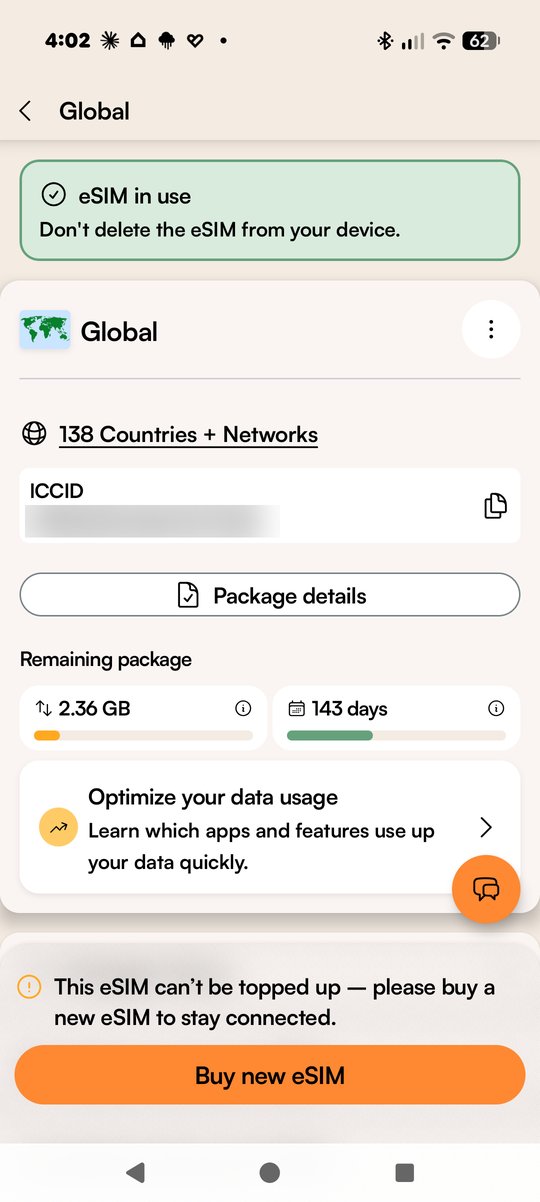
So for a while you’ll have both: your old eSIMs, running down, and the one new eSIM that every future package goes onto. To find the old ones in the app, go to Packages, tap your phone’s name, then View past eSIMs.
When an old one is fully used up, that’s the time to delete it from your phone. Rename it first if you’re not sure which is which (we clearly needed to).
Loading your first package?
New to Airalo: DREWDEALNEW Tap to copy Get Airalo →
Existing customers: DREWDEAL Tap to copy Open Airalo →
Weighing up Airalo against the alternatives? See our Airalo review, our best eSIM for Australians comparison, and this month’s eSIM deals.
Frequently asked questions
Do I need a new eSIM for every trip with Airalo now?
Not once you’re on the new Airalo. You set up one eSIM on your phone once, then buy a data package for each trip in the app.
How do I know if I have the new Airalo?
The app’s menu says Packages instead of My eSIMs. Airalo is also emailing invites as it moves people across.
What happens to my old Airalo eSIMs?
They keep working until their data or days run out, but you can’t top them up. Don’t delete one that still has data.
Can I buy data if I’ve run out?
Yes. The new Airalo app still opens with no data, so you can buy a package or contact support.
If I buy several packages, which one gets used first?
Local packages first, then regional, then global. Within the same type, the oldest one goes first. Each starts when your phone connects in a covered country.
Can I buy before I leave Australia?
Yes. The package shows “Ready to use” and starts when your phone first connects at your destination.
Does the new Airalo include calls and texts?
Not yet. It’s data only.
Can I move it to a new phone?
No. Packages stay with the phone they were bought for. Set up the new phone and buy a new package.
Do discount codes still work?
Yes, we’ve checked. Codes work on the new Airalo. The app sometimes suggests Airalo’s own code, so compare it with ours and use whichever saves more.