
eSIM Not Working? 8 Fixes, In the Order That Matters

I recently had a call from a buddy of mine who was in Milan airport with his partner in the background trying to get his eSIM to work. I was stumped but the solution was simple. I wish I had this simple checklist handy to share with him.
I’ve used travel eSIMs for years: Airalo mostly, plus Yesim and a few others. When an eSIM is “not working”, it’s almost never the eSIM. It’s when it was installed, or one of three switches.
Haven’t bought one yet? Good timing: nearly all of these problems are avoided before you fly. Start with which eSIM I’d buy for your trip and how much data you’ll need, then use the “Before you fly” steps below as your checklist.
Get 15% off your first Airalo eSIM →
Applied automatically through our link. No code to type.
The 30-second check
- Did you install it (not just buy it) on wifi before you left?
- Is the travel eSIM switched on?
- Is roaming turned on for the travel eSIM?
- Is mobile data set to use the travel eSIM?
Four yeses and it should work. If not, go through the list below in order.
What you’re seeing, and what’s causing it
| What you see | Likely cause | Fix |
|---|---|---|
| eSIM won’t install, or stuck on “activating” | No internet while installing | Step 2 |
| Installed, but “No service” | eSIM switched off, not landed yet, or plan doesn’t cover this country | Steps 5–6; check the plan’s countries |
| Signal bars but no internet | Roaming off on the eSIM, or data still on your home SIM | Steps 6–7 |
| Worked for days, then stopped | Data or days used up | Top up (Airalo users: 10% off top-ups here) |
| The eSIM has disappeared | It was deleted | Step 4 |
| Bank texts not arriving | Home SIM switched off | Step 8 |
Before you fly
1. Check your phone takes an eSIM and isn’t locked
Most phones from the last few years do. If Settings shows an option to add an eSIM, or an EID number under About, you’re fine. A phone locked to one carrier may refuse a travel eSIM, so check before you buy.
2. Install it on wifi at home
This is the one that catches people: buying an eSIM isn’t installing it. Paying gets you a QR code or an install button in the app, and nothing is on your phone until you install it.
Installing downloads the eSIM to your phone, and that needs internet. Leave it until you land and you may have no internet to install it with. Do it at home the week before, on your own wifi.
Use the provider’s app or one-tap install link. On an iPhone you can also install from a screenshot of the QR code (Settings → Mobile Service → Add eSIM → Use QR Code → Open Photos). I’m a big fan of keeping the provider’s app on your phone anyway: it’s the simplest way to track your data and top up.
3. Name it, then leave it switched off
Your phone will call it something useless like “Plus”. Rename it: “Airalo Japan 3–17 Nov”. Once you’ve got a few, you’ll be glad you did.
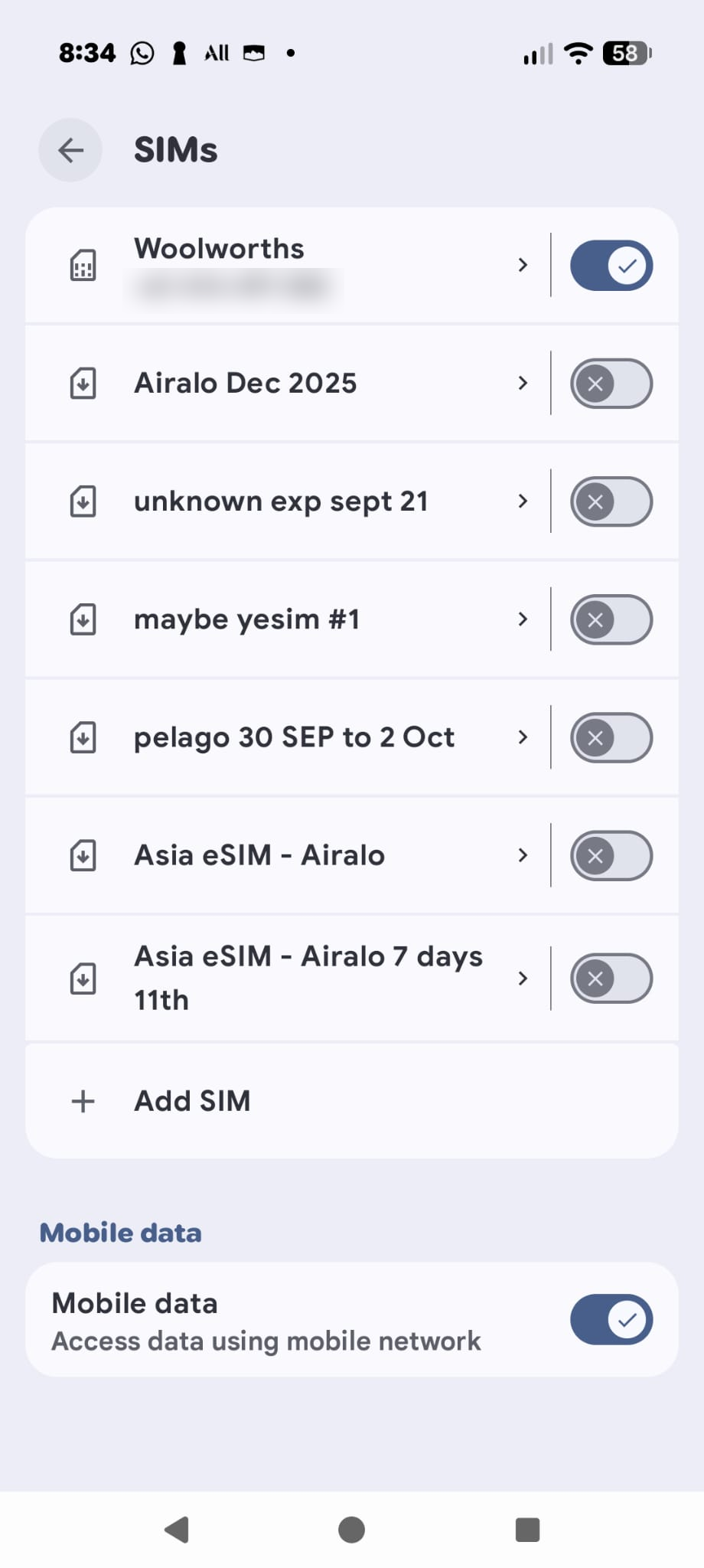
When the days start depends on the plan. Most Airalo plans start when the eSIM first connects to a network it covers, and Nomad eSIM’s start when it connects in your destination (or automatically 60 days after purchase). Global plans cover Australia too, so they start as soon as they connect at home. Some Yesim plans start at installation, or even at purchase, so check before you buy; Airalo shows it in the app under the plan’s Validity Policy. I buy a 12-month global plan, so a few days used before I leave don’t matter.
4. Don’t delete it
Airalo eSIMs usually can’t be reinstalled once deleted. Yesim and Nomad eSIM can usually be restored from the original QR code. Either way, switch it off when you’re not using it and keep it until the plan has run out.
When you land
5. Switch the travel eSIM on
Turn it on in your SIM settings. Nothing else works until it’s on.
6. Turn roaming on for the travel eSIM
This is the big one. A travel eSIM is a SIM from a phone company in another country, borrowing a local network. One of mine shows a Polish carrier in its settings. So your phone sees it as roaming, and with roaming off it won’t connect. Turning it on costs nothing extra: you’ve already paid for the data.
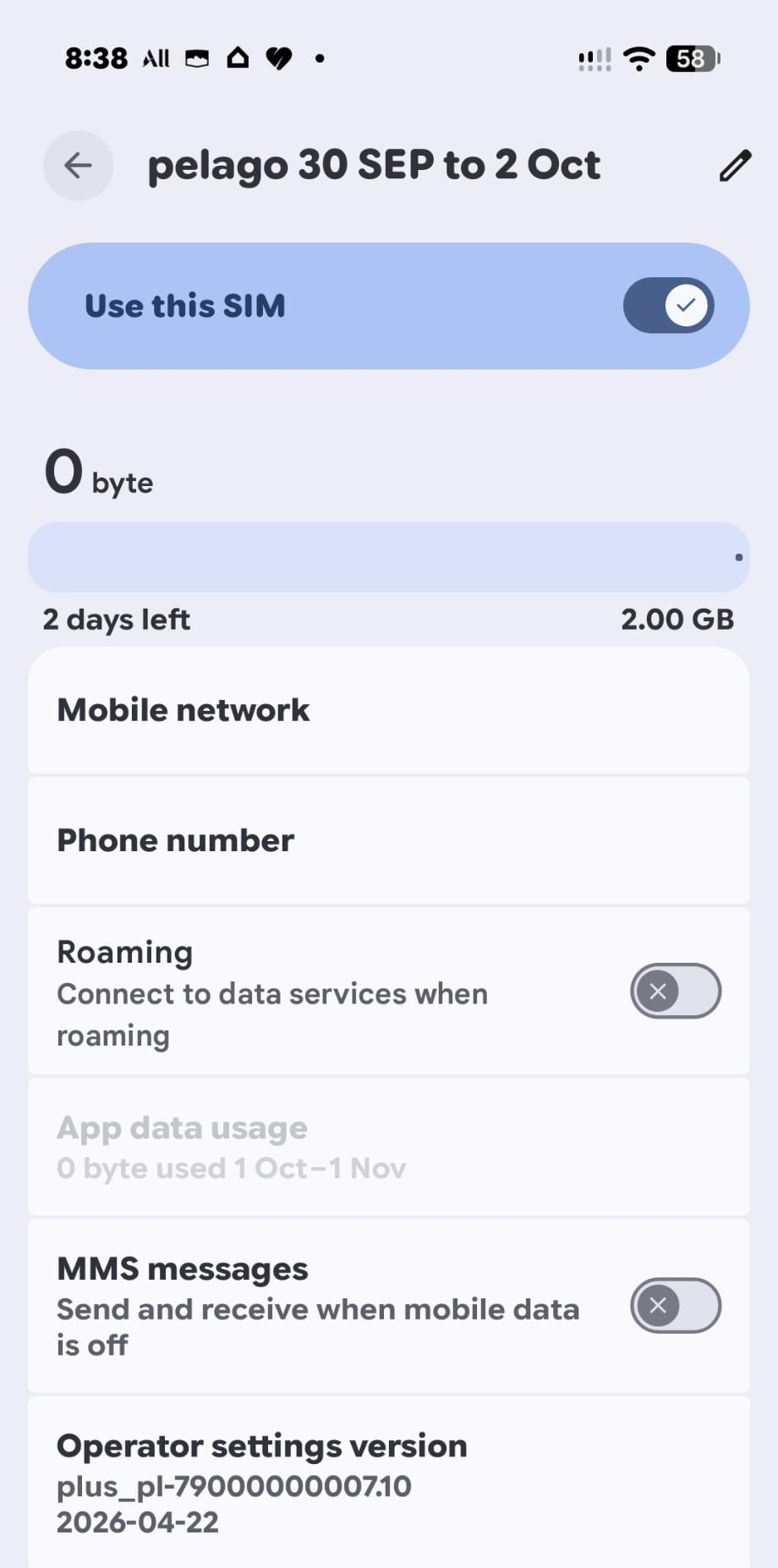
- Android: Settings → Network & internet → SIMs → tap the travel eSIM → Roaming on. Menus vary a little by brand.
- iPhone: Settings → Mobile Service → tap the travel eSIM → Data Roaming on.
7. Set mobile data to the travel eSIM
Your phone needs telling which SIM to use for data. On Android it’s in the SIMs screen; on iPhone it’s the Mobile Data setting in Mobile Service.
8. Check your home SIM’s roaming
Leave your home SIM on so bank codes and calls still arrive by text. Many prepaid carriers (my Woolworths Mobile included) have roaming off by default, but some plans charge a daily roaming fee the moment you use data. Check yours before you go. More on this in keeping bank SMS codes working overseas.
Still no data?
- Turn airplane mode on and off, or restart the phone.
- Pick a network manually: turn off automatic network selection and choose another local network.
- Check the APN. That’s the setting that tells your phone how to reach the network’s internet. It’s normally set automatically, but some Android phones need it typed in; your provider’s app or help page lists it.
- Contact support with a screenshot of your SIM settings. It saves a lot of back and forth.
Connected, but pages feel slow even though a speed test looks fast? That’s usually lag, not a fault. Many travel eSIMs send your data through another country before it reaches the internet. See my side-by-side test in Sydney, where three eSIMs on the same network gave very different results.
Airalo, Yesim or Nomad eSIM not working?
The same eight checks apply to every brand. Airalo, Yesim and Nomad eSIM all have apps that show the data and days you have left, let you top up, and put you in touch with support. If you’ve been through the list and it still won’t connect, message support from the app with a screenshot of your SIM settings.
Topping up Airalo? Use the existing-user link for 10% off rather than topping up in the app.
Which eSIM I’d buy (and how to get it cheaper)
I’ve used Airalo for years and it’s still my default. All three below have apps that make installing and topping up easy, and I’ve got a reader discount with each.
Airalo: my everyday pick
Biggest range of countries and regional plans. Discount applied automatically through these links.
New to Airalo: 15% off → Already use Airalo: 10% off, top-ups too →
Nomad eSIM: 15% off
Type DREWDEAL at checkout (plans over US$5). Days don’t start until you land.
Go to Nomad eSIM →Not sure which suits your trip? My best eSIM for Australians page compares them, and this month’s eSIM deals lists every current code. (Small referral our way if you use our link — doesn’t change your price.)
Frequently asked questions
I’ve bought my eSIM. Is it installed?
Not necessarily. Buying gets you a QR code or an install button in the provider’s app. It’s only installed once it appears in your phone’s SIM list, so check before you leave home.
Do I need roaming on for a travel eSIM?
Yes. A travel eSIM borrows a local network, so your phone treats it as roaming. Turn roaming on for the travel eSIM only, and check it’s off on your home SIM.
Will turning on roaming for my eSIM cost extra?
No. You’ve prepaid the data. The cost risk is roaming on your home SIM, not the travel eSIM.
When should I install my eSIM?
At home on wifi, a few days before you fly. Installing needs internet. On most Airalo and Nomad eSIM plans that won’t start the clock. On global plans and some Yesim plans it will, so check the plan’s start rule, and install a short global plan close to departure.
Can I install my eSIM at the airport when I land?
Only if you can get on reliable wifi first. It’s a gamble, so install at home.
I deleted my eSIM. Can I get it back?
It depends on the brand. Airalo usually can’t, though its app has a “Deleted your eSIM?” option that checks. Yesim and Nomad eSIM can usually be reinstalled from the original QR code. Contact support either way.
Will WhatsApp and bank texts still work?
WhatsApp keeps your number when you switch data to the eSIM. Bank texts still arrive as long as your home SIM stays switched on.
Related reading
- How much eSIM data do I need?
- Keeping bank SMS codes working overseas
- My Airalo Asia eSIM review
- This month’s eSIM deals and codes
Last checked: October 2026. Provider rules on activation and reinstalling come from Airalo, Yesim and Nomad eSIM’s own help pages.