
Qantas Family Transfer: Everything You Need to Know in 2026

Updated June, 2026 by Drew

That family holiday to Fiji is finally within reach, but your partner is 5,000 points short. As our family’s unofficial ‘points banker’, this is a problem I solve all the time — and the Qantas Family Transfer is how Australian frequent flyers fix it. The feature lets you move points between family members’ accounts for free, unlocking rewards that might otherwise be out of reach.
With Qantas’s recent devaluations making every point count more than ever, the rules matter. This guide breaks down the 2026 rules step-by-step, including the pitfalls, the fine print most people miss, and how to keep your whole family’s points picture in one place.
Why Bother? Five Reasons to Use Family Transfer
Qantas Family Transfers let you move points between accounts for free. Here’s why it’s a core strategy for any points-savvy Australian family:
- Pool points for big rewards. Combine your family’s smaller point stashes to book a major reward — like a Business Class flight to Europe — especially useful post-devaluation where higher balances are needed.
- Save a family member’s points from expiring. If a family member’s account has been inactive, transferring points to them may count as activity and reset their 18-month expiry clock. Note: sending points from your own account does not reset your own expiry clock — only the recipient benefits. See the expiry hack below for another approach.
- Warehouse points with an active family member. Transfer points to a family member who travels regularly — their ongoing account activity keeps the points alive until you need them back. Qantas won’t reverse a transfer on their end, but your family member can transfer them back to you as a new transaction whenever you’re ready.
- Top up for a specific flight. If someone’s just shy of an award flight (e.g. 8,000 points for a Sydney–Melbourne economy redemption), a quick transfer from another family member can seal the deal instantly.
- Book a flight for a family member directly. You don’t always need to transfer first — you can use your own points to book a reward flight for an eligible family member directly from your account. Often simpler, and doesn’t touch anyone’s transfer limits.
Who Can Transfer and Who Can Receive?
Any Qantas Frequent Flyer member can send points, but only to eligible family members who are also members of the program. Qantas is strict about this — here’s who qualifies:
| Relationship | Examples |
|---|---|
| Spouse / De Facto / Domestic Partner | Husband, Wife, Partner |
| Parents / Step-Parents | Mother, Father, Step-Mother |
| Children / Step-Children | Son, Daughter, Step-Son |
| Grandparents / Grandchildren | Grandmother, Grandson |
| Siblings / Half-Siblings | Brother, Sister, Half-Brother |
| In-Laws | Father-in-Law, Son-in-Law, Brother-in-Law |
| Extended Family | Uncle, Aunt, Nephew, Niece, First Cousin |
Qantas may ask for proof of relationship, so be prepared to verify if requested. See the full eligibility details on the official Qantas Family Transfer page.
How to Transfer Points — Step by Step
Can you do it in the Qantas app?
It’s a common question. As of 2026, the Family Transfer feature is not available in the Qantas Frequent Flyer mobile app. You can check your balance and manage bookings in the app, but you cannot initiate a transfer from it. You need to log in to the full Qantas website using a browser on your phone or computer.
Step by step
- Log in to your Qantas Frequent Flyer account at qantas.com.
- Navigate to the Family Transfer page — found under “Your Account” then “Points Transfer”.
- Enter the recipient’s Frequent Flyer number, last name, their relationship to you, and the number of points you wish to transfer.
- Qantas will send an SMS authorisation code to your registered mobile number — enter it to confirm. Points usually appear in the recipient’s account instantly.
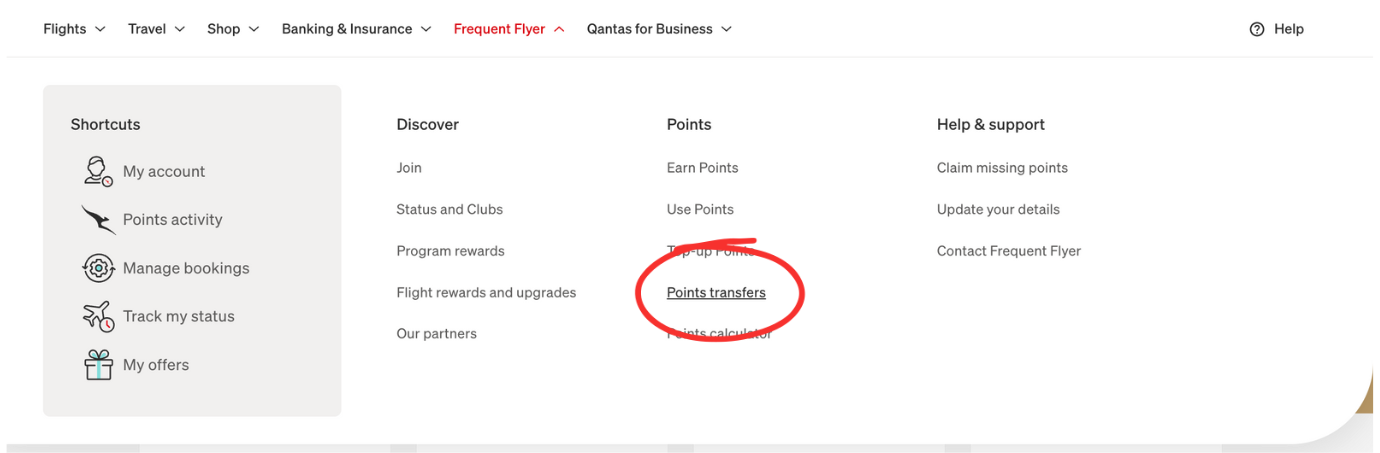
Family Transfer sits under Your Account → Points Transfer on the Qantas website.
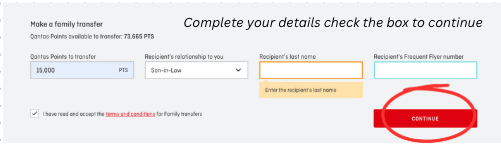
The transfer form — enter the recipient’s Frequent Flyer number, relationship and points amount, then confirm with your SMS code.
The Fine Print You Need to Know
- Minimum transfer: 1,500 points. Qantas reduced the minimum from 5,000 to 1,500 — useful for topping up smaller shortfalls.
- No annual cap. The old 600,000 point annual limit has been removed. You can transfer as many points as you like across the year.
- No fee — if you do it online. Transferring via qantas.com is free. A Reward Assistance Fee applies if you ask a Qantas consultant to do it by phone. Always do it online.
- No status credits. Transferred points are for rewards only. They do not count toward earning or retaining Silver, Gold, or Platinum status for the recipient.
- No reversals by Qantas. Once a transfer is made, Qantas will not undo it. Double-check the recipient’s details before confirming. Your family member can transfer the points back to you as a new transaction at any time — but that uses their allowance, not yours.
- Expiry — sender. Sending points does not count as activity on your own account and will not reset your expiry clock.
- Expiry — recipient. Receiving points may count as activity for the recipient and reset their 18-month expiry clock — but if their account has already been inactive for 18 months, transferred points can expire very quickly upon arrival. Act before the account goes fully stale, and confirm the current expiry rules directly with Qantas if you are relying on this.
- No cross-program transfers. You cannot transfer Qantas points to Velocity, KrisFlyer, or any other program directly.
- No flight credit transfers. Qantas flight credits from cancelled or changed bookings are tied to the original passenger and cannot be transferred — only points can move.
- Points Club doesn’t count. Points received via Family Transfer do not count toward Points Club or Points Club Plus membership thresholds.
Velocity Has a Different Approach — Family Pooling
If your family also earns Velocity points, the system works quite differently. Velocity calls their program Family Benefits — it pools points automatically rather than requiring individual manual transfers, and unlike Qantas it also allows status credits to be shared between family members. Worth understanding both programs if your family splits flying between Qantas and Virgin.
A Simpler Alternative: Book the Flight Directly
You don’t always need to transfer points first. If you have enough in your own account, you can book a reward flight for an eligible family member directly — choosing their name as the passenger during the booking process.
This is often simpler: no transfer limits, no waiting, no risk of the recipient’s account having expiry issues. The main reason to transfer instead is if the family member wants to combine points from their own account with yours, or if they want the flexibility to book themselves.
New in 2026: Lounge Pass Transfer Rules Have Changed
This isn’t directly about points transfers, but readers of this article will want to know. From 1 July 2026, Qantas complimentary lounge passes can only be transferred to someone travelling on the same flight as you. The old practice of gifting a lounge pass to a family member on a different flight is no longer possible — use any passes you want to gift before the deadline. Platinum One invitations are not affected.
If you’re travelling soon and want to know which lounges your family can access across Australian and international airports, our free Airport Lounge Finder covers 196 lounges across 34 airports and shows exactly which cards and memberships get you in. And if you’re heading overseas, an Airalo eSIM is worth considering — data in 200+ countries without the roaming bill. New users get 15% off via our link. (Small referral our way if you use our link — doesn’t change your price.)
Keep Track of Your Family’s Points
The trickiest part of a family points strategy isn’t the transfers — it’s knowing what everyone has. It’s easy to transfer your Qantas points without realising your partner has a Velocity balance that would have been a better source, or that someone’s points are sitting idle and about to expire.
Our free Points Consolidator lets you enter balances across Qantas, Velocity and Amex Membership Rewards in one view, so you can see the full picture before deciding where to transfer from. No login, no sign-up — it runs entirely on your device.
- ✓ Minimum transfer: 1,500 points (reduced from 5,000)
- ✓ Annual cap: none — transfer as many as you like
- ✓ Transfer is instant — points appear in recipient’s account immediately
- ✓ Free when done online at qantas.com
- ✓ Receiving points may reset the recipient’s 18-month expiry clock
- ✕ Sending points does NOT reset your own expiry clock
- ✕ No status credits transferred — rewards points only
- ✕ Qantas won’t reverse a transfer — check details before confirming
- ✕ Cannot transfer flight credits, or transfer to non-family or other programs
- ✕ SMS authorisation required — check you can receive it if travelling overseas
- → From 1 July 2026: lounge pass gifts restricted to same-flight travel companions
Frequently Asked Questions
Yes. Any Qantas Frequent Flyer member can transfer points to an eligible family member at no cost when done online. The minimum transfer is 1,500 points and there is no annual cap on how many you can transfer. The transfer is usually instant.
It depends entirely on how you redeem them. For short domestic economy flights the value per point is relatively low. For long-haul business or first class redemptions the same points can be worth several times more — which is why premium cabin redemptions typically give the best return. Following Qantas’s recent devaluations, always compare the current points cost against the cash price of the flight before you commit, as the rates change periodically.
No. Qantas flight credits issued from cancelled or changed bookings are tied to the original passenger and cannot be transferred to anyone else — family member or otherwise. Only Qantas Points can be moved between accounts via Family Transfer.
In almost all cases the transfer is instant — points are deducted from your account and appear in the recipient’s account within minutes. If there is a delay, wait an hour before contacting Qantas. There is no fee for transfers completed online; a Reward Assistance Fee applies if you ask a Qantas consultant to complete it by phone. Note that you will need to receive an SMS authorisation code during the process — if you are travelling overseas without your Australian SIM, see our guide to receiving Australian SMS while travelling.
Yes — and this is often simpler than transferring first. When booking a reward flight on qantas.com you can select a different passenger name during checkout. The points come from your account, the seat goes to your family member. This works for any eligible family member and does not use your transfer limits.
Yes. Qantas defines family broadly — grandparents and grandchildren are explicitly included as eligible relationships. Extended family including aunts, uncles, nephews, nieces and first cousins also qualify.
For the recipient, receiving points may count as activity on their account and reset their 18-month expiry clock — but if their account has already been inactive for 18 months, transferred points can expire very quickly upon arrival. Always act before the account goes fully stale, and confirm the current expiry rules with Qantas directly if you are relying on this. For the sender, sending points does not reset your own expiry clock. The Qantas Wellbeing app is a useful way to generate account activity and reset your own clock without making a purchase.
Qantas will not reverse a transfer on their end — once it is done, it is final from their perspective. However, there is nothing stopping the recipient from transferring the points back to you as a new transaction at any time. It is not a reversal in Qantas’s system, just a new transfer in the opposite direction.
As of 2026 there is no annual cap on Qantas Family Transfers. The old limit of 600,000 points per year has been removed. The minimum transfer is 1,500 points.
No fee if you do it yourself online at qantas.com. A Reward Assistance Fee applies if you ask a Qantas Frequent Flyer Service Centre consultant to complete the transfer by phone. Always do it online to avoid the charge.
No. Family Transfers are restricted to eligible family members only. Transferring to friends, colleagues or anyone outside the eligible relationship list is against Qantas Frequent Flyer terms and conditions and could put your account at risk of suspension.
No. Family Transfers only move Qantas points between Qantas Frequent Flyer accounts. You cannot transfer Qantas points directly to Velocity, KrisFlyer, or any other loyalty program. If your family also earns Velocity points, see our guide to Velocity Family Pooling — it works quite differently to the Qantas system.
Not as of 2026. Family Transfer is only available through the full Qantas website in a browser. Log in at qantas.com and navigate to Your Account → Points Transfer → Family Transfer.
No on both counts. Points received via Family Transfer do not count toward Silver, Gold or Platinum status, and do not count toward Points Club or Points Club Plus thresholds. They can only be used for reward redemptions.
Qantas Family Transfer requires you to manually move points between individual accounts one transaction at a time. Velocity’s Family Pooling works automatically and also allows status credits to be shared between family members — something Qantas does not offer. If your family flies both carriers it is worth understanding how each program works.